> ## Documentation Index
> Fetch the complete documentation index at: https://docs.pinata.cloud/llms.txt
> Use this file to discover all available pages before exploring further.
# Domains & Routes
> Expose web services from inside your agent to the internet
By default, anything your agent runs on a port stays inside the container — nobody on the outside can reach it. Routes punch a hole through so the outside can.
You'd want this if your agent is hosting a web app, an API, or a dev server you want to view in a browser. If your agent just chats and runs scripts, you don't need any of this.
 ## Two kinds of route
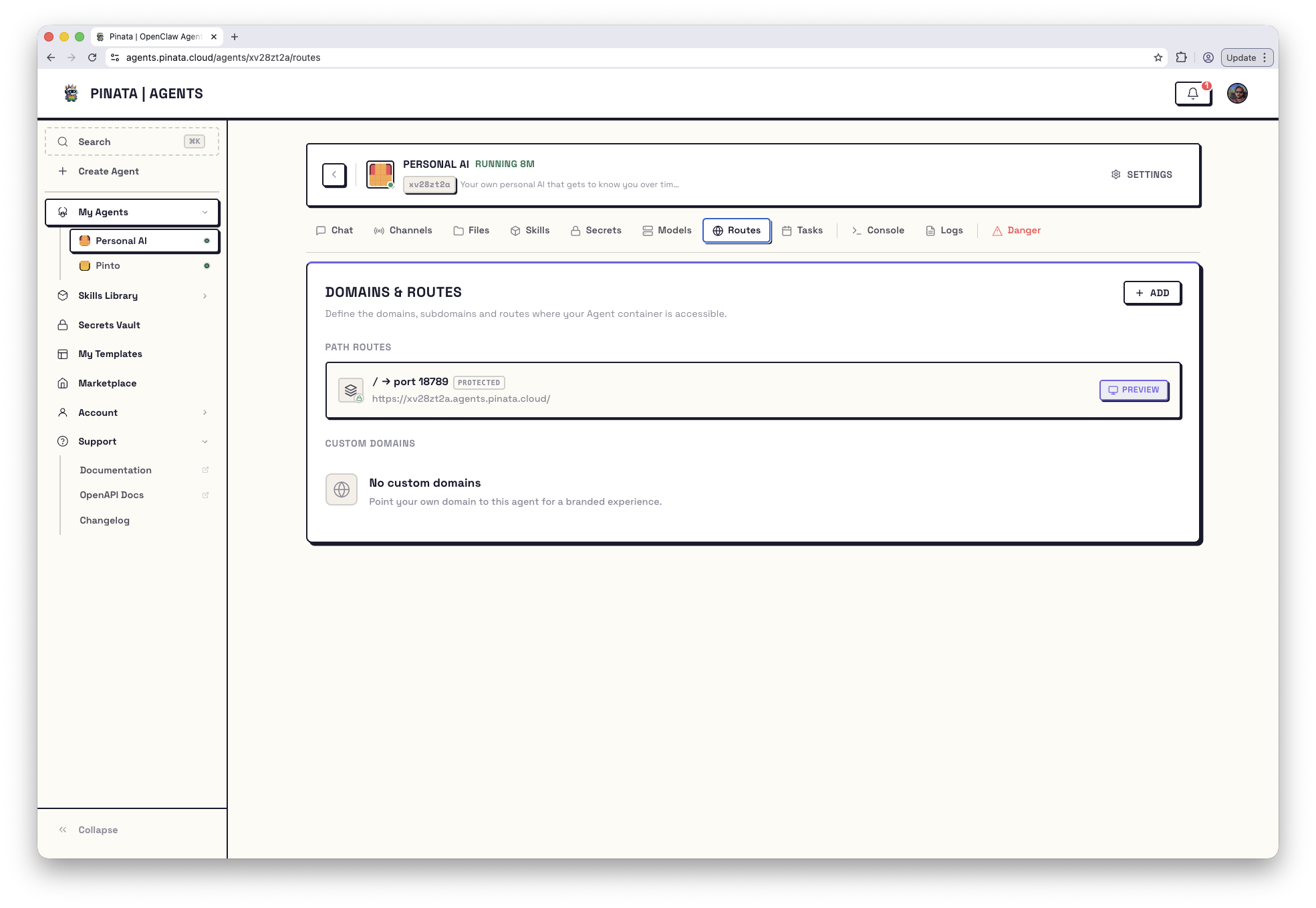
Open your agent → **Routes**. There are two sections:
* **Path routes** — your service is reachable on the agent's own subdomain, under a path prefix you choose. No DNS work; works immediately.
* **Custom domains** — your service is reachable on a Pinata-provided subdomain (`name-name-NN.apps.pinata.cloud`) or on your own domain.
Click **+ ADD** to add either.
## Path routes
This is the simplest option. Pick a port and a path; the route becomes available at:
```text theme={null}
https://{agentId}.agents.pinata.cloud//...
```
Click **+ ADD** → **Path Route**, then fill in:
1. **Container port** — the port your service is listening on inside the agent (e.g. `5173`)
2. **Path prefix** — the URL path (e.g. `/app`, or `/` for everything)
3. **Public** or **Protected** access — see below
One thing to know: the path prefix is **stripped** before the request hits your service. If someone visits `/app/users/123`, your service sees `/users/123`. Most frameworks let you configure a base path to match — for Vite that's `base: "/app"`.
## Custom domains
Custom domains are currently in beta.
There are two flavors.
### Pinata-provided subdomain
Easiest. You get a random `name-name-NN.apps.pinata.cloud` subdomain that points at your agent.
1. **+ ADD** → **Subdomain** tab
2. Optionally rename the auto-generated subdomain (you can also accept the default)
3. Set the container port and Public/Protected
4. **Register** — it's live immediately
### Bring your own domain
1. **+ ADD** → **Custom Domain** tab
2. Type your domain (e.g. `app.example.com`)
3. Pinata gives you a TXT record value — add it as `_pinata-verify.app.example.com` at your DNS provider
4. Submit the registration
5. Pinata gives you a CNAME target — add a CNAME from `app.example.com` to that target
6. Click **Verify**
After Verify, Pinata checks your TXT record, then provisions an SSL certificate through Cloudflare. The domain shows up in the list with a status; once it reads **active**, traffic is flowing.
DNS propagation and SSL provisioning typically take a few minutes. If your domain stays in a pending state, see [Troubleshooting → Custom domain stuck pending](/agents/troubleshooting#custom-domain-stuck-pending).
### Editing a custom domain
Once registered, you can change the **target port** and the **Protected** flag. You can't rename the domain — to switch, delete and recreate.
## Public vs Protected
Every route, path or domain, is one or the other.
* **Public** — anyone on the internet can reach it. Use this if your service handles its own auth, or you genuinely want it open.
* **Protected** — requests must include the agent's gateway token. The token can be in the `Authorization: Bearer` header, a `?token=...` query string, or a `gw_token` cookie. Use this when you want the route locked down with no extra work.
Public means *public*. Think before flipping that switch.
## Building a web app that works behind a route
Two things have to be true or it won't work, and the fix is almost always one of them:
1. **Your server has to bind to `0.0.0.0`**, not `localhost`. The gateway can't reach `localhost` from outside the process.
2. **Your dev server has to allow the agent's host**. Vite, Next, etc. check `Host` and reject unknowns by default.
Use the placeholder `__AGENT_HOST__` in config files — it's replaced at runtime with the agent's public hostname. Example for Vite:
```ts theme={null}
export default defineConfig({
base: "/app",
server: {
host: "0.0.0.0",
allowedHosts: ["__AGENT_HOST__"],
hmr: {
host: "__AGENT_HOST__",
protocol: "wss",
clientPort: 443,
},
},
});
```
If a route 404s or 502s after you've set everything up, [Troubleshooting → Routes not working](/agents/troubleshooting#routes) covers the common causes.
## Limits and reserved values
* Up to **10 path routes** per agent
* Up to **5 custom domains** per agent
* Container ports must be between `1025` and `65535`. Port `18789` is reserved for the gateway.
* Subdomains containing the word "pinata" or using reserved suffixes are rejected.
## Two kinds of route
Open your agent → **Routes**. There are two sections:
* **Path routes** — your service is reachable on the agent's own subdomain, under a path prefix you choose. No DNS work; works immediately.
* **Custom domains** — your service is reachable on a Pinata-provided subdomain (`name-name-NN.apps.pinata.cloud`) or on your own domain.
Click **+ ADD** to add either.
## Path routes
This is the simplest option. Pick a port and a path; the route becomes available at:
```text theme={null}
https://{agentId}.agents.pinata.cloud//...
```
Click **+ ADD** → **Path Route**, then fill in:
1. **Container port** — the port your service is listening on inside the agent (e.g. `5173`)
2. **Path prefix** — the URL path (e.g. `/app`, or `/` for everything)
3. **Public** or **Protected** access — see below
One thing to know: the path prefix is **stripped** before the request hits your service. If someone visits `/app/users/123`, your service sees `/users/123`. Most frameworks let you configure a base path to match — for Vite that's `base: "/app"`.
## Custom domains
Custom domains are currently in beta.
There are two flavors.
### Pinata-provided subdomain
Easiest. You get a random `name-name-NN.apps.pinata.cloud` subdomain that points at your agent.
1. **+ ADD** → **Subdomain** tab
2. Optionally rename the auto-generated subdomain (you can also accept the default)
3. Set the container port and Public/Protected
4. **Register** — it's live immediately
### Bring your own domain
1. **+ ADD** → **Custom Domain** tab
2. Type your domain (e.g. `app.example.com`)
3. Pinata gives you a TXT record value — add it as `_pinata-verify.app.example.com` at your DNS provider
4. Submit the registration
5. Pinata gives you a CNAME target — add a CNAME from `app.example.com` to that target
6. Click **Verify**
After Verify, Pinata checks your TXT record, then provisions an SSL certificate through Cloudflare. The domain shows up in the list with a status; once it reads **active**, traffic is flowing.
DNS propagation and SSL provisioning typically take a few minutes. If your domain stays in a pending state, see [Troubleshooting → Custom domain stuck pending](/agents/troubleshooting#custom-domain-stuck-pending).
### Editing a custom domain
Once registered, you can change the **target port** and the **Protected** flag. You can't rename the domain — to switch, delete and recreate.
## Public vs Protected
Every route, path or domain, is one or the other.
* **Public** — anyone on the internet can reach it. Use this if your service handles its own auth, or you genuinely want it open.
* **Protected** — requests must include the agent's gateway token. The token can be in the `Authorization: Bearer` header, a `?token=...` query string, or a `gw_token` cookie. Use this when you want the route locked down with no extra work.
Public means *public*. Think before flipping that switch.
## Building a web app that works behind a route
Two things have to be true or it won't work, and the fix is almost always one of them:
1. **Your server has to bind to `0.0.0.0`**, not `localhost`. The gateway can't reach `localhost` from outside the process.
2. **Your dev server has to allow the agent's host**. Vite, Next, etc. check `Host` and reject unknowns by default.
Use the placeholder `__AGENT_HOST__` in config files — it's replaced at runtime with the agent's public hostname. Example for Vite:
```ts theme={null}
export default defineConfig({
base: "/app",
server: {
host: "0.0.0.0",
allowedHosts: ["__AGENT_HOST__"],
hmr: {
host: "__AGENT_HOST__",
protocol: "wss",
clientPort: 443,
},
},
});
```
If a route 404s or 502s after you've set everything up, [Troubleshooting → Routes not working](/agents/troubleshooting#routes) covers the common causes.
## Limits and reserved values
* Up to **10 path routes** per agent
* Up to **5 custom domains** per agent
* Container ports must be between `1025` and `65535`. Port `18789` is reserved for the gateway.
* Subdomains containing the word "pinata" or using reserved suffixes are rejected.