> ## Documentation Index
> Fetch the complete documentation index at: https://docs.pinata.cloud/llms.txt
> Use this file to discover all available pages before exploring further.
# Secrets
> Where API keys and credentials live
Your agent needs credentials — an LLM key, sometimes a bot token or two, maybe a database password. The Secrets Vault is where those live. They're encrypted at rest, never returned by the API after you save them, and injected into the agent as environment variables when its container starts.
You can't read a secret's value back once it's saved. Make sure you have it stored somewhere safe before you paste it in here.
 ## Connect a provider
You don't strictly need one — the Create Agent wizard offers a **Free tier** option that runs your agent on a shared, rate-limited model with no key at all. But connecting your own provider unlocks full model quality, context, and rate limits, and it's how a free-tier agent upgrades later.
Open the [Secrets Vault](https://agents.pinata.cloud/secrets). The row at the top — **AI PROVIDERS** — has a card for each supported provider:
| Provider | How it connects |
| -------------- | ------------------------------------------------------------ |
| **Anthropic** | API key |
| **OpenAI** | API key, or OAuth into a Codex subscription |
| **OpenRouter** | API key |
| **Pinata** | Pinata-hosted inference |
| **Venice** | API key (privacy-focused) |
| **Custom** | Any OpenAI-compatible endpoint |
| **Free tier** | Nothing — selected in the Create Agent wizard, no key needed |
Cards that aren't connected show a **CONNECT** button. Click it, follow the prompts, save. The card flips to **Connected**.
You can connect more than one provider — useful for fallbacks, or for routing different agents to different LLMs.
## Add other secrets
For everything that isn't a provider key — bot tokens, third-party API keys, database URLs — use **New Secret** at the top right of the Vault.
The dialog asks for:
1. A **name** (this is the environment variable, like `TELEGRAM_BOT_TOKEN`)
2. A **value**
3. A **type** — `secret` or `variable`
Save. Your agent will see it as `process.env.TELEGRAM_BOT_TOKEN` (or the equivalent in Python, Bash, etc.) on next restart.
### Secret vs variable
Both become env vars. The difference is encryption:
* **Secret** — encrypted at rest, never returned in API responses. Use for anything sensitive: keys, tokens, passwords.
* **Variable** — stored as plaintext, value returned in listings. Use for non-sensitive config — public URLs, feature flags.
If you're unsure, choose **secret**. There's no downside.
### Importing a `.env`
Have a `.env` file already? The New Secret menu has an **Import .env** option that adds every line in one go.
## Make a secret available to an agent
Saving a secret in the Vault doesn't automatically give it to every agent. You attach secrets per-agent — that way you can give different agents different credentials.
* **When creating an agent**: step 3 of the wizard ("Connect") lets you pick which secrets to attach.
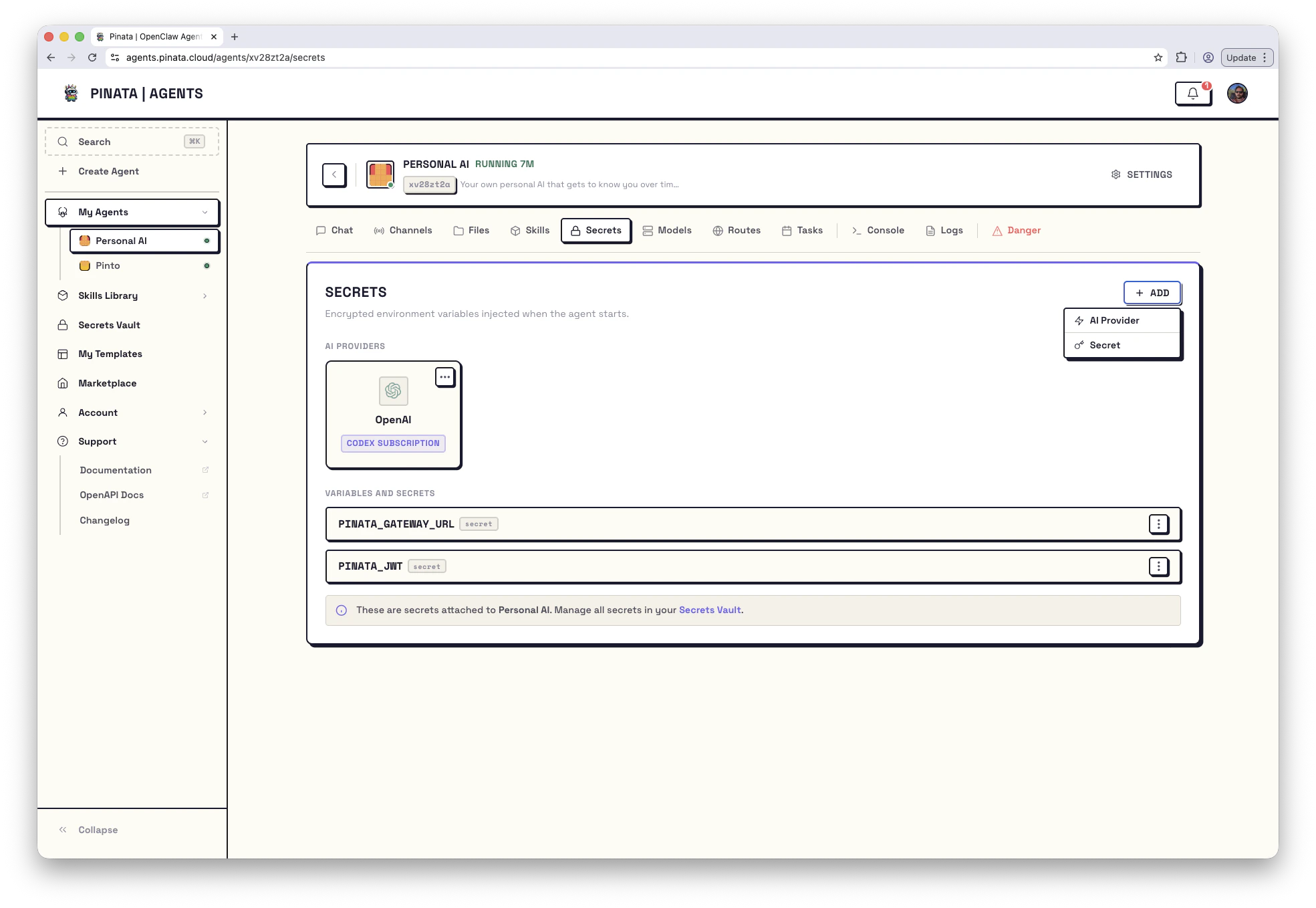
* **For an existing agent**: open the agent → **Secrets** → **+ ADD** and pick from your Vault.
On the agent's Secrets tab you'll see two sections:
1. **AI Providers** — the providers you've connected. Each card shows whether it's an `API KEY` connection or a `CODEX SUBSCRIPTION`.
2. **Variables and Secrets** — the non-provider secrets you've attached.
At the bottom of the same page is the **Gateway Token** — the credential other tools use to talk to *this specific agent*. See [HTTP API → Gateway token](/agents/api#gateway-token) for what to do with it.
When you add or update a secret on a running agent, restart the gateway so the agent picks up the new value. The Danger tab shows a per-secret **Synced** indicator so you can tell whether you've already done that.
## Updating, removing, and edge cases
* Click the **⋯** menu on any secret to update its value or delete it.
* You can't delete a secret that's still attached to an agent — detach it first, or you'll get a `409 Conflict`.
* Updating a value doesn't roll out automatically — restart the gateway.
* Attaching two credentials for the same provider (say, an OpenAI API key *and* a Codex subscription) returns a `409 Conflict`. Pick one.
## From the CLI
```bash theme={null}
pinata agents secrets list # See your secrets
pinata agents secrets add # Add one
pinata agents secrets delete # Remove one
```
## How secrets are protected
* Encrypted with AES-GCM using a key derived per user
* Values are never returned by the API after creation
* Injected as environment variables at container start, never written to disk
* The per-agent gateway token is generated automatically and can be rotated from the Danger tab
## Connect a provider
You don't strictly need one — the Create Agent wizard offers a **Free tier** option that runs your agent on a shared, rate-limited model with no key at all. But connecting your own provider unlocks full model quality, context, and rate limits, and it's how a free-tier agent upgrades later.
Open the [Secrets Vault](https://agents.pinata.cloud/secrets). The row at the top — **AI PROVIDERS** — has a card for each supported provider:
| Provider | How it connects |
| -------------- | ------------------------------------------------------------ |
| **Anthropic** | API key |
| **OpenAI** | API key, or OAuth into a Codex subscription |
| **OpenRouter** | API key |
| **Pinata** | Pinata-hosted inference |
| **Venice** | API key (privacy-focused) |
| **Custom** | Any OpenAI-compatible endpoint |
| **Free tier** | Nothing — selected in the Create Agent wizard, no key needed |
Cards that aren't connected show a **CONNECT** button. Click it, follow the prompts, save. The card flips to **Connected**.
You can connect more than one provider — useful for fallbacks, or for routing different agents to different LLMs.
## Add other secrets
For everything that isn't a provider key — bot tokens, third-party API keys, database URLs — use **New Secret** at the top right of the Vault.
The dialog asks for:
1. A **name** (this is the environment variable, like `TELEGRAM_BOT_TOKEN`)
2. A **value**
3. A **type** — `secret` or `variable`
Save. Your agent will see it as `process.env.TELEGRAM_BOT_TOKEN` (or the equivalent in Python, Bash, etc.) on next restart.
### Secret vs variable
Both become env vars. The difference is encryption:
* **Secret** — encrypted at rest, never returned in API responses. Use for anything sensitive: keys, tokens, passwords.
* **Variable** — stored as plaintext, value returned in listings. Use for non-sensitive config — public URLs, feature flags.
If you're unsure, choose **secret**. There's no downside.
### Importing a `.env`
Have a `.env` file already? The New Secret menu has an **Import .env** option that adds every line in one go.
## Make a secret available to an agent
Saving a secret in the Vault doesn't automatically give it to every agent. You attach secrets per-agent — that way you can give different agents different credentials.
* **When creating an agent**: step 3 of the wizard ("Connect") lets you pick which secrets to attach.
* **For an existing agent**: open the agent → **Secrets** → **+ ADD** and pick from your Vault.
On the agent's Secrets tab you'll see two sections:
1. **AI Providers** — the providers you've connected. Each card shows whether it's an `API KEY` connection or a `CODEX SUBSCRIPTION`.
2. **Variables and Secrets** — the non-provider secrets you've attached.
At the bottom of the same page is the **Gateway Token** — the credential other tools use to talk to *this specific agent*. See [HTTP API → Gateway token](/agents/api#gateway-token) for what to do with it.
When you add or update a secret on a running agent, restart the gateway so the agent picks up the new value. The Danger tab shows a per-secret **Synced** indicator so you can tell whether you've already done that.
## Updating, removing, and edge cases
* Click the **⋯** menu on any secret to update its value or delete it.
* You can't delete a secret that's still attached to an agent — detach it first, or you'll get a `409 Conflict`.
* Updating a value doesn't roll out automatically — restart the gateway.
* Attaching two credentials for the same provider (say, an OpenAI API key *and* a Codex subscription) returns a `409 Conflict`. Pick one.
## From the CLI
```bash theme={null}
pinata agents secrets list # See your secrets
pinata agents secrets add # Add one
pinata agents secrets delete # Remove one
```
## How secrets are protected
* Encrypted with AES-GCM using a key derived per user
* Values are never returned by the API after creation
* Injected as environment variables at container start, never written to disk
* The per-agent gateway token is generated automatically and can be rotated from the Danger tab