> ## Documentation Index
> Fetch the complete documentation index at: https://docs.pinata.cloud/llms.txt
> Use this file to discover all available pages before exploring further.
# Skills
> Reusable capability packages you can attach to an agent
Skills are how you teach an agent new tricks without rewriting it. A skill is a folder of files — code, instructions, sometimes a `.env.example` listing what credentials it needs. When you attach a skill to an agent, those files land in the agent's workspace and the agent can use them.
There are two views to keep separate in your head:
* The **Skills Library** in the sidebar — the catalog of skills installed in your account. This includes the ones Pinata publishes and any you've added from the community or your own folder.
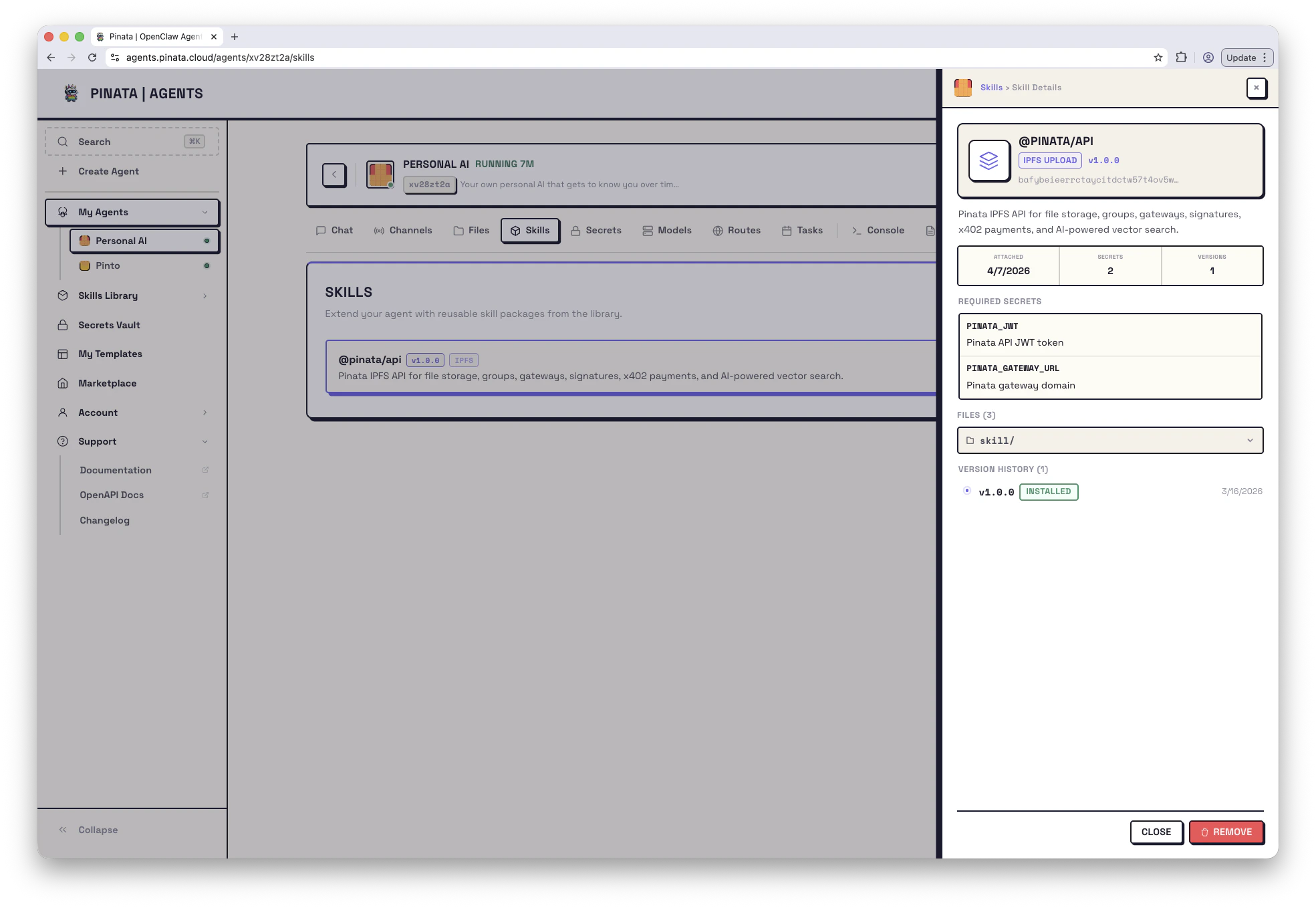
* A specific agent's **Skills tab** — which subset of the library is actually attached to *this* agent. Installing a skill in the Library doesn't attach it; attachment happens per-agent.
 ## Find a skill
Open the **Skills Library** in the sidebar.
Two tabs at the top:
* **All | Installed** — skills already in your library
* **Browse ClawHub** — the community catalog
Search by name in either tab. Each card shows the skill name, author, install count, version, and a CID prefix. Pinata-built skills (like `@pinata/api`) carry a verified badge and show up in both tabs.
### Skills Pinata maintains
* **`@pinata/api`** — store and retrieve files on IPFS, use gateways, run vector searches, sign x402 payments
* **`@pinata/erc-8004`** — register your agent on-chain and verify other agents (ERC-8004)
* **`@pinata/memory-salience`** — let your agent remember what matters across conversations
* **`@pinata/paraspace`** — organize the workspace with the PARA method
* **`@pinata/sqlite-sync`** — a SQLite database with automatic Pinata backup and CID-chained history
* **`@pinata/platform`** — the agent can call back into the platform (install skills, set secrets, manage tasks) without ever seeing your Pinata JWT. Bundled by default.
## Install a skill
Click a card to see its description, files, and required env vars. **Install** adds it to your library. From there, you can attach it to as many agents as you like.
Installing alone doesn't change anything about your running agents — you still need to attach it.
## Attach a skill to an agent
* **When creating a new agent**: step 2 of the wizard lets you pick skills from your library.
* **For an existing agent**: open the agent → **Skills** → **+ ADD** and pick from your library.
Attaching copies the skill's files into the agent's workspace under `workspace/skills//`. The agent reads from there.
If the skill declares required env vars in a `.env.example`, the Skills tab flags any that aren't set on the agent. Add the missing values in the [Secrets Vault](/agents/secrets) and attach them, then restart the gateway.
Detaching a skill removes its files from the agent's workspace but keeps the skill installed in your library. You can re-attach later.
## Slugs vs CIDs
Anywhere you reference a skill — in the CLI, in [`manifest.json`](/agents/manifest), in API calls — you have two ways to identify it:
* **ClawHub slug** (`@pinata/api`) — always resolves to the latest published version. Easiest for templates and shared configs.
* **IPFS CID** (`bafybeicglyjdb6w...`) — pins one specific version. Use when you want byte-stable behavior or you're using a self-hosted skill not on ClawHub.
In `manifest.json` each skill is an object with `name` plus either `clawhub_slug` or `cid`:
```json theme={null}
"skills": [
{ "clawhub_slug": "@pinata/api", "name": "Pinata API" },
{ "clawhub_slug": "@pinata/memory-salience", "name": "Memory Salience" }
]
```
See the [manifest reference](/agents/manifest#skills) for the full schema.
## Versions and updates
Skills follow semver. Each card shows the current version (`v1.0.0`, etc.).
* **Update** — if a newer version exists, the Skills tab will show an update available. Update from there. For ClawHub skills, this pulls the latest published version.
* **Roll back** — open a skill's version history and pick an earlier version. Internally that re-pins to that version's CID.
If you're building automation, you can also check for updates via the API: `GET /v0/agents/{agentId}/skills/updates`.
## Publishing your own
Have something useful? Package it as a skill.
1. Put your files in a folder
2. Add a `SKILL.md` with YAML frontmatter — at minimum, `name` and `description`
3. Optional: a `.env.example` declaring required env vars (the UI will read this and flag missing values when someone attaches it)
```markdown theme={null}
---
name: my-skill
description: What this skill does
---
# My Skill
Instructions the agent should follow when using this skill.
```
In the Skills Library, click **Upload Skill**, choose your folder, give it a name and description, then **Upload & Register**.
Skill folders are pinned to public IPFS. Don't include secrets or anything you wouldn't paste into a Gist.
## From the CLI
```bash theme={null}
pinata agents skills list # See your library
pinata agents skills create # Upload a new skill
pinata agents clawhub list # Browse the community catalog
pinata agents clawhub install # Install a community skill
```
## Limits
* Up to **10 skills** attached per agent
* Skill names: letters, numbers, hyphens, underscores
* Folder size limits follow Pinata's IPFS upload limits
## Find a skill
Open the **Skills Library** in the sidebar.
Two tabs at the top:
* **All | Installed** — skills already in your library
* **Browse ClawHub** — the community catalog
Search by name in either tab. Each card shows the skill name, author, install count, version, and a CID prefix. Pinata-built skills (like `@pinata/api`) carry a verified badge and show up in both tabs.
### Skills Pinata maintains
* **`@pinata/api`** — store and retrieve files on IPFS, use gateways, run vector searches, sign x402 payments
* **`@pinata/erc-8004`** — register your agent on-chain and verify other agents (ERC-8004)
* **`@pinata/memory-salience`** — let your agent remember what matters across conversations
* **`@pinata/paraspace`** — organize the workspace with the PARA method
* **`@pinata/sqlite-sync`** — a SQLite database with automatic Pinata backup and CID-chained history
* **`@pinata/platform`** — the agent can call back into the platform (install skills, set secrets, manage tasks) without ever seeing your Pinata JWT. Bundled by default.
## Install a skill
Click a card to see its description, files, and required env vars. **Install** adds it to your library. From there, you can attach it to as many agents as you like.
Installing alone doesn't change anything about your running agents — you still need to attach it.
## Attach a skill to an agent
* **When creating a new agent**: step 2 of the wizard lets you pick skills from your library.
* **For an existing agent**: open the agent → **Skills** → **+ ADD** and pick from your library.
Attaching copies the skill's files into the agent's workspace under `workspace/skills//`. The agent reads from there.
If the skill declares required env vars in a `.env.example`, the Skills tab flags any that aren't set on the agent. Add the missing values in the [Secrets Vault](/agents/secrets) and attach them, then restart the gateway.
Detaching a skill removes its files from the agent's workspace but keeps the skill installed in your library. You can re-attach later.
## Slugs vs CIDs
Anywhere you reference a skill — in the CLI, in [`manifest.json`](/agents/manifest), in API calls — you have two ways to identify it:
* **ClawHub slug** (`@pinata/api`) — always resolves to the latest published version. Easiest for templates and shared configs.
* **IPFS CID** (`bafybeicglyjdb6w...`) — pins one specific version. Use when you want byte-stable behavior or you're using a self-hosted skill not on ClawHub.
In `manifest.json` each skill is an object with `name` plus either `clawhub_slug` or `cid`:
```json theme={null}
"skills": [
{ "clawhub_slug": "@pinata/api", "name": "Pinata API" },
{ "clawhub_slug": "@pinata/memory-salience", "name": "Memory Salience" }
]
```
See the [manifest reference](/agents/manifest#skills) for the full schema.
## Versions and updates
Skills follow semver. Each card shows the current version (`v1.0.0`, etc.).
* **Update** — if a newer version exists, the Skills tab will show an update available. Update from there. For ClawHub skills, this pulls the latest published version.
* **Roll back** — open a skill's version history and pick an earlier version. Internally that re-pins to that version's CID.
If you're building automation, you can also check for updates via the API: `GET /v0/agents/{agentId}/skills/updates`.
## Publishing your own
Have something useful? Package it as a skill.
1. Put your files in a folder
2. Add a `SKILL.md` with YAML frontmatter — at minimum, `name` and `description`
3. Optional: a `.env.example` declaring required env vars (the UI will read this and flag missing values when someone attaches it)
```markdown theme={null}
---
name: my-skill
description: What this skill does
---
# My Skill
Instructions the agent should follow when using this skill.
```
In the Skills Library, click **Upload Skill**, choose your folder, give it a name and description, then **Upload & Register**.
Skill folders are pinned to public IPFS. Don't include secrets or anything you wouldn't paste into a Gist.
## From the CLI
```bash theme={null}
pinata agents skills list # See your library
pinata agents skills create # Upload a new skill
pinata agents clawhub list # Browse the community catalog
pinata agents clawhub install # Install a community skill
```
## Limits
* Up to **10 skills** attached per agent
* Skill names: letters, numbers, hyphens, underscores
* Folder size limits follow Pinata's IPFS upload limits