> ## Documentation Index
> Fetch the complete documentation index at: https://docs.pinata.cloud/llms.txt
> Use this file to discover all available pages before exploring further.
# Files & Snapshots
> Browse, version, and edit your agent's workspace
The Files tab gives you four things: a snapshot history of the agent's workspace, content diffs so you can see what changed between snapshots, a file browser for the agent's container, and a git URL so you can clone the workspace locally and edit it like any other repo.
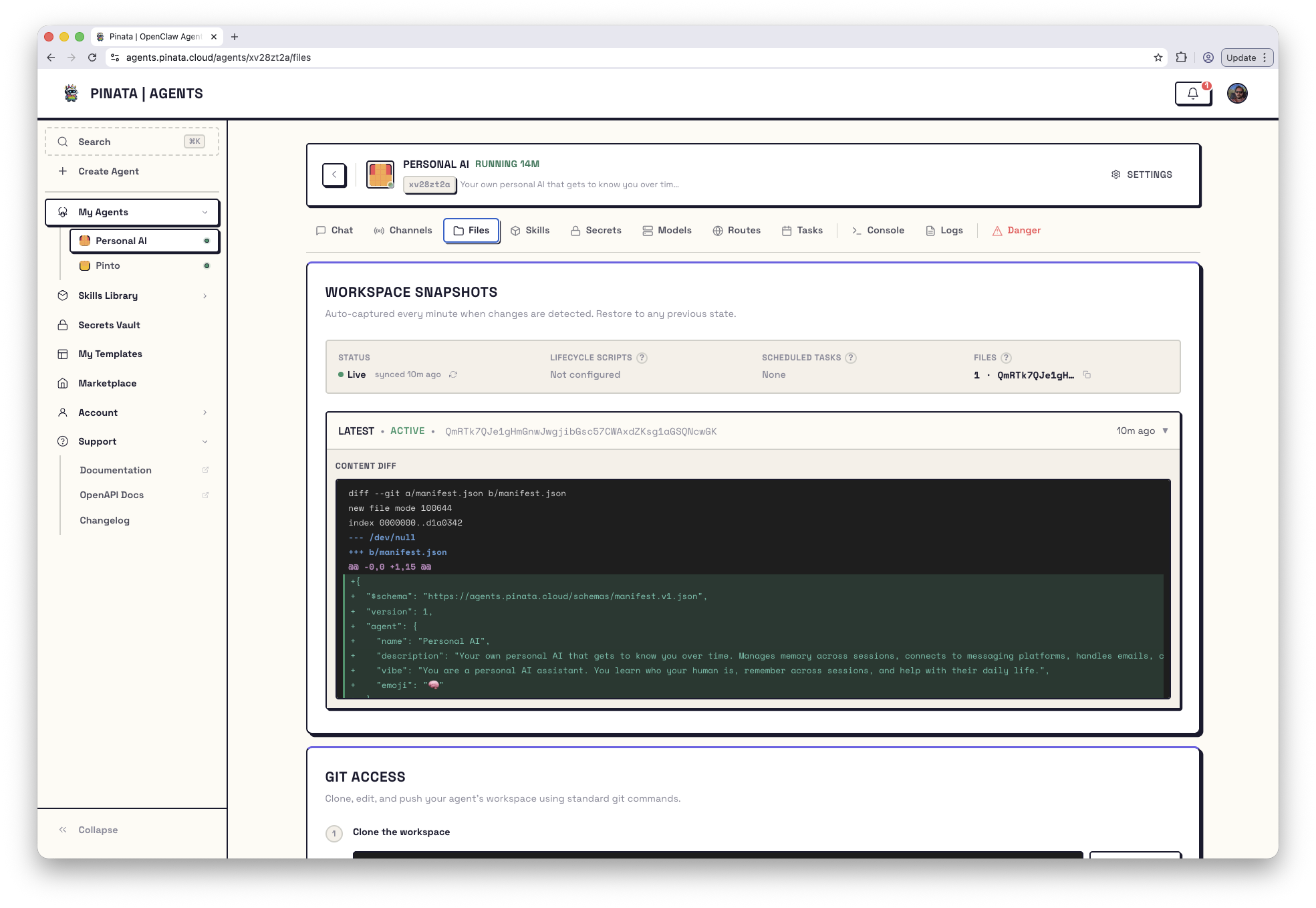 ## Workspace Snapshots
Every minute or so, when the workspace has changed, Pinata captures a snapshot. Each snapshot is the entire workspace pinned to IPFS as a single CID — your full file tree at that point in time, immutable.
The summary card at the top shows:
* **Status** — `Live`, plus how long ago the workspace last synced
* **Lifecycle Scripts** — whether `build` and `start` are configured (and their run state if they are)
* **Scheduled Tasks** — whether any tasks are set up
* **Files** — total file count and the current snapshot CID
Below the summary is the snapshot list — newest at the top, labeled `LATEST`, `V9`, `V8`, and so on. Click any version to expand its **Content Diff** — a file-by-file view of what changed since the previous snapshot, rendered as either a unified or side-by-side diff.
Common file you'll see diffs for: `manifest.json`. See the [manifest reference](/agents/manifest) for what every field means.
## Restore an older snapshot
If a recent change broke something, you can roll back.
1. Find the snapshot you want in the list
2. Open it
3. **Restore**
Under the hood this runs a `git --hard` reset to the commit associated with that snapshot. The current workspace is replaced — anything that hadn't been captured into a snapshot yet is lost.
Restore is destructive. Snapshot the current state first if you might want to come back to it.
## Force a snapshot now
Snapshots run on their own, but you can trigger one immediately:
```bash theme={null}
curl -X POST \
-H "Authorization: Bearer $PINATA_JWT" \
https://agents.pinata.cloud/v0/agents/$AGENT_ID/snapshots/sync
```
The same endpoint with `GET` returns sync status — whether storage is configured, when it last synced, and a human-readable message.
## Workspace Files — browse the container
Below the snapshot list, the **Workspace Files** panel is a live file browser for the agent's pod filesystem — not just the workspace, the whole container.
* **Navigate** — click a folder to enter it, use the breadcrumb or **← Up** to go back, **Workspace** to jump straight to the workspace root, **Refresh** to re-read the current directory
* **View a file** — click it. Text and markdown files preview inline with size and MIME type; binary files offer a **Download** instead
* **Upload** — drop files onto the listing or click **Upload** to put files into the current directory
Handy for checking what an agent actually wrote, reading logs in place (e.g. `/home/hermes/data/logs/` on a Hermes agent), or dropping in a config file without opening the [Console](/agents/console).
## Editing the workspace locally
The workspace is a git repo, served by Pinata. Clone, edit in your IDE, commit, push.
```bash theme={null}
git clone https://agents.pinata.cloud/v0/agents/{agentId}/git my-agent
```
Click **Copy with Token** in the Files tab and you get a URL with the gateway token already baked in as HTTP Basic auth — no credential setup, just clone and go.
### Pushing changes
```bash theme={null}
# edit files in workspace/ or skills/
git add -A
git commit -m "tweak the workspace"
git push
```
When you push, the server commits any pending agent-side changes first, then applies your push on top. That means your push automatically picks up anything the agent has been writing.
After a push, the agent's `build` script (if you've set one) runs automatically. Check the **Lifecycle Scripts** row to watch its status. Details: [Manifest → Scripts](/agents/manifest#scripts).
### Pulling agent-side changes
Your agent writes to the same workspace as it works. To sync that locally:
```bash theme={null}
git pull
```
### Persistent credentials
Copying the tokened URL every time gets old. Expand **Setup Persistent Credentials** in the Files tab and follow the instructions — git stores the credentials, future operations authenticate automatically.
## Reading or uploading files programmatically
Two endpoints, both on the agent's subdomain:
* `GET /v0/agents/{agentId}/files?path=` — read any file inside the container
* `POST /v0/agents/{agentId}/files/upload` — upload a base64-encoded file into `/uploads/`
Both require auth (Pinata JWT or gateway token). See [API → Files](/agents/api#files).
## Workspace Snapshots
Every minute or so, when the workspace has changed, Pinata captures a snapshot. Each snapshot is the entire workspace pinned to IPFS as a single CID — your full file tree at that point in time, immutable.
The summary card at the top shows:
* **Status** — `Live`, plus how long ago the workspace last synced
* **Lifecycle Scripts** — whether `build` and `start` are configured (and their run state if they are)
* **Scheduled Tasks** — whether any tasks are set up
* **Files** — total file count and the current snapshot CID
Below the summary is the snapshot list — newest at the top, labeled `LATEST`, `V9`, `V8`, and so on. Click any version to expand its **Content Diff** — a file-by-file view of what changed since the previous snapshot, rendered as either a unified or side-by-side diff.
Common file you'll see diffs for: `manifest.json`. See the [manifest reference](/agents/manifest) for what every field means.
## Restore an older snapshot
If a recent change broke something, you can roll back.
1. Find the snapshot you want in the list
2. Open it
3. **Restore**
Under the hood this runs a `git --hard` reset to the commit associated with that snapshot. The current workspace is replaced — anything that hadn't been captured into a snapshot yet is lost.
Restore is destructive. Snapshot the current state first if you might want to come back to it.
## Force a snapshot now
Snapshots run on their own, but you can trigger one immediately:
```bash theme={null}
curl -X POST \
-H "Authorization: Bearer $PINATA_JWT" \
https://agents.pinata.cloud/v0/agents/$AGENT_ID/snapshots/sync
```
The same endpoint with `GET` returns sync status — whether storage is configured, when it last synced, and a human-readable message.
## Workspace Files — browse the container
Below the snapshot list, the **Workspace Files** panel is a live file browser for the agent's pod filesystem — not just the workspace, the whole container.
* **Navigate** — click a folder to enter it, use the breadcrumb or **← Up** to go back, **Workspace** to jump straight to the workspace root, **Refresh** to re-read the current directory
* **View a file** — click it. Text and markdown files preview inline with size and MIME type; binary files offer a **Download** instead
* **Upload** — drop files onto the listing or click **Upload** to put files into the current directory
Handy for checking what an agent actually wrote, reading logs in place (e.g. `/home/hermes/data/logs/` on a Hermes agent), or dropping in a config file without opening the [Console](/agents/console).
## Editing the workspace locally
The workspace is a git repo, served by Pinata. Clone, edit in your IDE, commit, push.
```bash theme={null}
git clone https://agents.pinata.cloud/v0/agents/{agentId}/git my-agent
```
Click **Copy with Token** in the Files tab and you get a URL with the gateway token already baked in as HTTP Basic auth — no credential setup, just clone and go.
### Pushing changes
```bash theme={null}
# edit files in workspace/ or skills/
git add -A
git commit -m "tweak the workspace"
git push
```
When you push, the server commits any pending agent-side changes first, then applies your push on top. That means your push automatically picks up anything the agent has been writing.
After a push, the agent's `build` script (if you've set one) runs automatically. Check the **Lifecycle Scripts** row to watch its status. Details: [Manifest → Scripts](/agents/manifest#scripts).
### Pulling agent-side changes
Your agent writes to the same workspace as it works. To sync that locally:
```bash theme={null}
git pull
```
### Persistent credentials
Copying the tokened URL every time gets old. Expand **Setup Persistent Credentials** in the Files tab and follow the instructions — git stores the credentials, future operations authenticate automatically.
## Reading or uploading files programmatically
Two endpoints, both on the agent's subdomain:
* `GET /v0/agents/{agentId}/files?path=` — read any file inside the container
* `POST /v0/agents/{agentId}/files/upload` — upload a base64-encoded file into `/uploads/`
Both require auth (Pinata JWT or gateway token). See [API → Files](/agents/api#files).