> ## Documentation Index
> Fetch the complete documentation index at: https://docs.pinata.cloud/llms.txt
> Use this file to discover all available pages before exploring further.
# Tasks
> Run prompts on a schedule
Tasks are scheduled prompts. The agent runs them automatically — every Monday morning, every six hours, once next Tuesday at 2pm, whatever you set. Use them for daily check-ins, periodic reports, automation triggered by time rather than by a message.
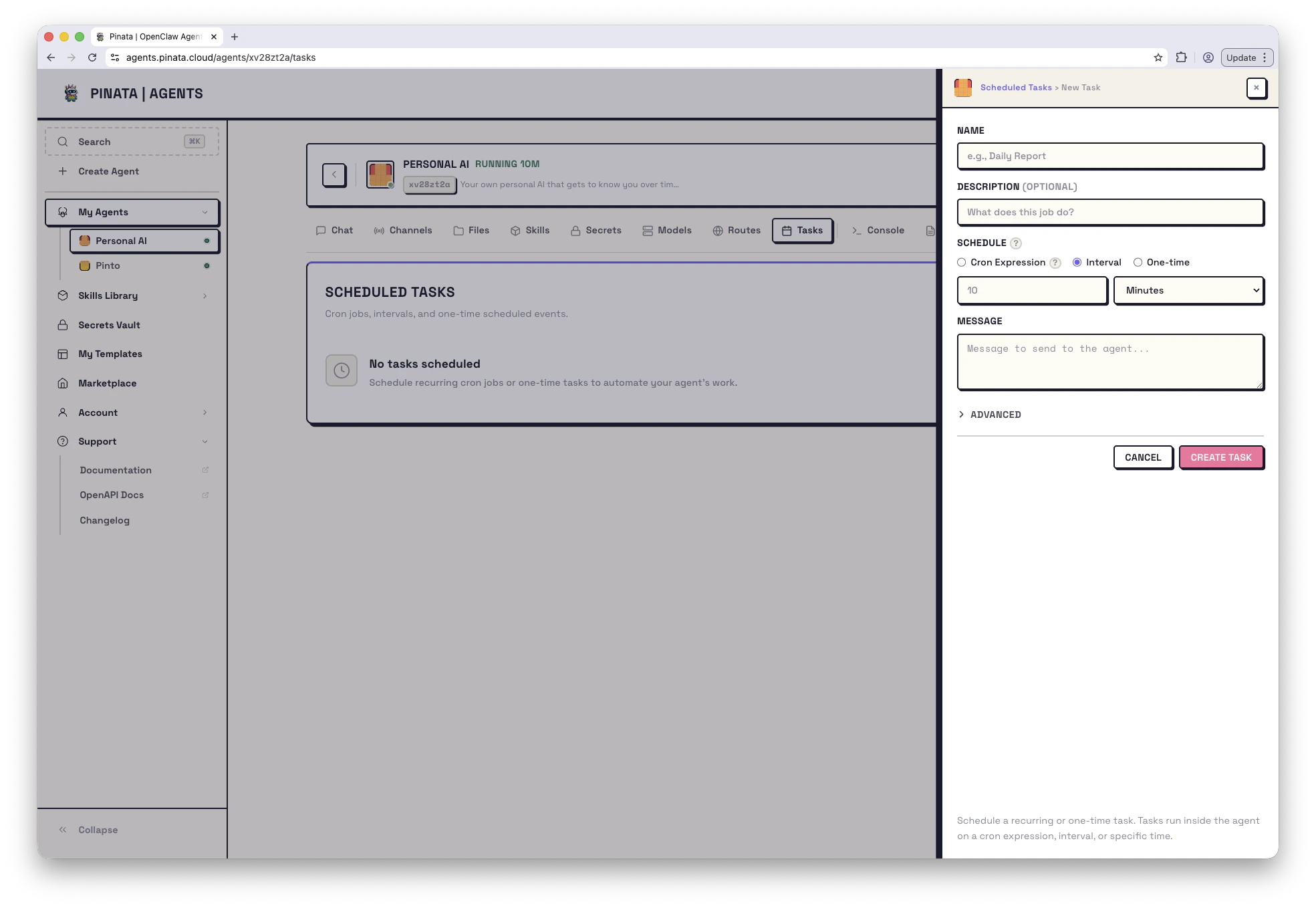 ## Create a task
Open your agent → **Tasks** → **+ ADD**.
The dialog asks for:
1. **Name** — anything readable, e.g. `daily-check-in`
2. **Schedule** — when it runs
3. **Prompt or system event** — what gets delivered to the agent
4. **Delivery (optional)** — where the response goes if you want it to leave the agent
That's it. Save and the task starts running on the schedule.
## Schedule types
You have three choices for `schedule.kind`:
* **Cron** — standard cron expression. Most flexible.
```text theme={null}
0 9 * * * # Every day at 9am
0 */6 * * * # Every six hours
0 9 * * 1-5 # Weekdays at 9am
```
* **Every** — run every N milliseconds. Set `staggerMs` if you want to randomize the start offset so multiple tasks don't fire at the same instant.
* **At** — run once at a specific ISO timestamp.
You can set a timezone (`tz`) so cron respects DST and local time. Minimum interval across all kinds is 1 minute — anything tighter is rejected.
## What gets delivered
Two payload kinds:
* **`agentTurn`** (default) — your task fires a chat message. The agent treats it like a regular conversation turn. You can pin a specific `model`, toggle reasoning on or off via `thinking`, and set a `timeoutSeconds`.
Good prompts to schedule:
> "Check my portfolio and summarize anything that moved more than 5% today."
>
> "Generate the weekly status report from the work log."
* **`systemEvent`** — fires a system event instead. The agent sees it as a non-conversational trigger. Useful for heartbeats, periodic maintenance, or anything you don't want polluting the chat history.
## Where the response goes
By default, the response lands back in the agent's main conversation. If you want it to go somewhere else:
* **Announce to a channel** — send the response to Telegram, Slack, or Discord. Set `delivery.mode` to `announce`, plus a channel and recipient. Good for alerts or daily standups.
```json theme={null}
"delivery": { "mode": "announce", "channel": "telegram", "to": "123456789" }
```
* **Webhook** — POST it to a URL. Good for hooking into other services.
```json theme={null}
"delivery": { "mode": "webhook", "to": "https://example.com/hook" }
```
Set `bestEffort: true` in delivery if you'd rather swallow a delivery failure than mark the whole run as failed.
## Sessions: main vs isolated
A task can run in the agent's main conversation (so its output is part of the running chat history) or in an isolated session of its own. Pick one with `sessionTarget`:
* `main` — output joins the live conversation
* `isolated` — one-off session that doesn't touch the main thread. Good for batch jobs and webhook-style work.
## Wake mode
`wakeMode` controls timing:
* `now` (default) — fire the task at the scheduled time, even if the agent is busy
* `next-heartbeat` — wait for the next heartbeat tick. Useful for low-priority background work.
## Managing tasks
Each task in the list has:
* **Run now** — fire it immediately, doesn't affect the schedule
* **Enable / disable** — pause without deleting
* **Edit** — change schedule, prompt, or delivery
* **Delete** — remove it
* **Runs** — open the run history
Run history shows what fired and when, and whether each run succeeded.
## From the CLI
```bash theme={null}
pinata agents tasks list
pinata agents tasks create
pinata agents tasks run
pinata agents tasks delete
```
## Limits and gotchas
* **20 tasks** per agent
* Minimum interval **1 minute**
* A task that runs longer than `timeoutSeconds` (or 5 minutes if unset) is cancelled and marked failed
* Tasks survive agent restarts. Schedules that would have fired during downtime are skipped, not queued.
## Create a task
Open your agent → **Tasks** → **+ ADD**.
The dialog asks for:
1. **Name** — anything readable, e.g. `daily-check-in`
2. **Schedule** — when it runs
3. **Prompt or system event** — what gets delivered to the agent
4. **Delivery (optional)** — where the response goes if you want it to leave the agent
That's it. Save and the task starts running on the schedule.
## Schedule types
You have three choices for `schedule.kind`:
* **Cron** — standard cron expression. Most flexible.
```text theme={null}
0 9 * * * # Every day at 9am
0 */6 * * * # Every six hours
0 9 * * 1-5 # Weekdays at 9am
```
* **Every** — run every N milliseconds. Set `staggerMs` if you want to randomize the start offset so multiple tasks don't fire at the same instant.
* **At** — run once at a specific ISO timestamp.
You can set a timezone (`tz`) so cron respects DST and local time. Minimum interval across all kinds is 1 minute — anything tighter is rejected.
## What gets delivered
Two payload kinds:
* **`agentTurn`** (default) — your task fires a chat message. The agent treats it like a regular conversation turn. You can pin a specific `model`, toggle reasoning on or off via `thinking`, and set a `timeoutSeconds`.
Good prompts to schedule:
> "Check my portfolio and summarize anything that moved more than 5% today."
>
> "Generate the weekly status report from the work log."
* **`systemEvent`** — fires a system event instead. The agent sees it as a non-conversational trigger. Useful for heartbeats, periodic maintenance, or anything you don't want polluting the chat history.
## Where the response goes
By default, the response lands back in the agent's main conversation. If you want it to go somewhere else:
* **Announce to a channel** — send the response to Telegram, Slack, or Discord. Set `delivery.mode` to `announce`, plus a channel and recipient. Good for alerts or daily standups.
```json theme={null}
"delivery": { "mode": "announce", "channel": "telegram", "to": "123456789" }
```
* **Webhook** — POST it to a URL. Good for hooking into other services.
```json theme={null}
"delivery": { "mode": "webhook", "to": "https://example.com/hook" }
```
Set `bestEffort: true` in delivery if you'd rather swallow a delivery failure than mark the whole run as failed.
## Sessions: main vs isolated
A task can run in the agent's main conversation (so its output is part of the running chat history) or in an isolated session of its own. Pick one with `sessionTarget`:
* `main` — output joins the live conversation
* `isolated` — one-off session that doesn't touch the main thread. Good for batch jobs and webhook-style work.
## Wake mode
`wakeMode` controls timing:
* `now` (default) — fire the task at the scheduled time, even if the agent is busy
* `next-heartbeat` — wait for the next heartbeat tick. Useful for low-priority background work.
## Managing tasks
Each task in the list has:
* **Run now** — fire it immediately, doesn't affect the schedule
* **Enable / disable** — pause without deleting
* **Edit** — change schedule, prompt, or delivery
* **Delete** — remove it
* **Runs** — open the run history
Run history shows what fired and when, and whether each run succeeded.
## From the CLI
```bash theme={null}
pinata agents tasks list
pinata agents tasks create
pinata agents tasks run
pinata agents tasks delete
```
## Limits and gotchas
* **20 tasks** per agent
* Minimum interval **1 minute**
* A task that runs longer than `timeoutSeconds` (or 5 minutes if unset) is cancelled and marked failed
* Tasks survive agent restarts. Schedules that would have fired during downtime are skipped, not queued.