> ## Documentation Index
> Fetch the complete documentation index at: https://docs.pinata.cloud/llms.txt
> Use this file to discover all available pages before exploring further.
# Creating Templates
> Share your agent configuration as a template
Templates let you package an agent configuration for reuse or sharing. This guide walks through the workflow: clone the starter, customize files, deploy from your template to test, and (optionally) submit it to the marketplace.
For the full `manifest.json` field reference, see the [manifest reference](/agents/manifest).
Clone this starter repo to create your own template.
## Clone the Starter
Fork or clone the [reference template](https://github.com/PinataCloud/agent-template) to get started:
```bash theme={null}
git clone https://github.com/PinataCloud/agent-template my-template
cd my-template
```
Your repository should have this structure:
```text theme={null}
manifest.json # Agent config - see /agents/manifest
README.md # Description shown in marketplace listing
workspace/
BOOTSTRAP.md # First-run conversation guide (self-deletes after setup)
SOUL.md # Agent personality and principles
AGENTS.md # Workspace conventions, memory system, safety rules
IDENTITY.md # Agent name, vibe, emoji (filled in during bootstrap)
USER.md # Notes about the human (learned over time)
TOOLS.md # Environment-specific notes
HEARTBEAT.md # Periodic tasks (empty by default)
```
## Configure `manifest.json`
The manifest defines your agent's identity, required secrets, skills, scripts, routes, channels, tasks, and marketplace metadata. The starter ships with a `_docs` block documenting every field inline.
| Section | What it does |
| ---------- | -------------------------------------------------------------------------------------- |
| `agent` | Name, description, vibe, emoji |
| `model` | Default AI model |
| `secrets` | Encrypted API keys and credentials |
| `skills` | Attachable skill packages — objects with `clawhub_slug` or `cid` and a `name` (max 10) |
| `tasks` | Cron-scheduled prompts (max 20) |
| `scripts` | Lifecycle hooks - `build` runs after deploy/push, `start` runs on agent boot |
| `routes` | Port forwarding for web apps/APIs (max 10) |
| `channels` | Telegram, Discord, Slack configuration |
| `template` | Marketplace listing metadata |
See the [manifest reference](/agents/manifest) for every field's type, defaults, and limits.
Remove the `_docs` block before submitting to the marketplace.
### Skills
Skills are objects with a `name` and either a `clawhub_slug` or a `cid`. Use `clawhub_slug` for marketplace skills — they'll automatically resolve to the latest published version when someone deploys your template. Use `cid` to pin a specific uploaded skill by its IPFS CID for byte-stable behavior.
```json theme={null}
// ClawHub marketplace skill
{
"clawhub_slug": "@pinata/api",
"name": "Pinata API"
}
// Uploaded skill pinned by CID
{
"cid": "bafkreiexample...",
"name": "My Custom Skill"
}
```
### Example
A complete manifest that includes secrets, skills, lifecycle scripts, a web route, and a daily scheduled task:
```json theme={null}
{
"$schema": "https://agents.pinata.cloud/schemas/manifest.v1.json",
"version": 1,
"engine": "openclaw",
"agent": {
"name": "Useful Assistant",
"description": "Personal AI helper with file reading, web search, and memory management",
"emoji": "🧠",
"vibe": "Resourceful and opinionated"
},
"template": {
"slug": "useful-assistant",
"category": "general",
"partnerName": "Pinata",
"tags": ["assistant", "personal", "productivity"]
},
"secrets": [
{
"name": "EXAMPLE_API_KEY",
"description": "Optional API key for external service",
"required": false
}
],
"scripts": {
"build": "cd workspace/projects/hello-test && npm install --include=dev",
"start": "cd workspace/projects/hello-test && npx vite --host 0.0.0.0"
},
"skills": [
{ "clawhub_slug": "@pinata/api", "name": "Pinata API" }
],
"routes": [
{ "port": 5173, "path": "/app", "protected": false }
],
"tasks": [
{
"name": "daily-check-in",
"schedule": { "kind": "cron", "expr": "0 9 * * *" },
"payload": { "kind": "agentTurn", "text": "Good morning! Review my workspace and suggest priorities for today." }
}
]
}
```
## Customize Workspace Files
Files in `workspace/` are copied to the agent's workspace on deploy. Customize these to define your agent's personality and behavior:
| File | Purpose |
| -------------- | ------------------------------------------------------- |
| `BOOTSTRAP.md` | First-run conversation guide (self-deletes after setup) |
| `SOUL.md` | Agent personality and principles - **customize this** |
| `AGENTS.md` | Workspace conventions, memory system, safety rules |
| `IDENTITY.md` | Agent name, vibe, emoji (filled in during bootstrap) |
| `USER.md` | Notes about the human (learned over time) |
| `TOOLS.md` | Environment-specific notes |
| `HEARTBEAT.md` | Periodic tasks (empty by default) |
Focus on `SOUL.md` to give your agent a distinct personality, and `BOOTSTRAP.md` if you want a custom onboarding flow.
## Add Web App Support (Optional)
If your agent runs a server, API, or frontend dev server, add two things to `manifest.json`:
1. **`scripts`** - lifecycle hooks that install deps and start the server
2. **`routes`** - port forwarding rules that expose the server to the internet
Example from a Vite + React agent:
```json theme={null}
{
"scripts": {
"build": "cd workspace/projects/myapp && npm install --include=dev",
"start": "cd workspace/projects/myapp && npx vite --host 0.0.0.0"
},
"routes": [
{ "port": 5173, "path": "/app", "protected": false }
]
}
```
**Important details:**
* **`build`** - Runs once after deploy or git push (e.g. `npm install`, compile). Executes from `/home/node/clawd`. Output logged to `/tmp/user-build.log`. 5 min timeout. If build fails, start does not run.
* **`start`** - Launches a long-running background process after build completes (e.g. a web server). Executes from `/home/node/clawd`. Output logged to `/tmp/user-start.log`. Runs detached so it survives the runner exiting.
* **Retry scripts** - To re-run the build/start lifecycle (e.g. after pushing changes that didn't trigger a build), use the **Retry Scripts** action on the Danger tab or call `POST /v0/agents/{agentId}/scripts/retry`.
* Your server **must bind to `0.0.0.0`**, not `localhost`, or it won't be reachable
* Set `protected: false` for public routes, or `true` to require a gateway token
* Use `__AGENT_HOST__` as a placeholder in config files - replaced at runtime with the agent's public hostname
* For WebSocket/HMR setups (e.g. Vite), connect via WSS on port 443 through `__AGENT_HOST__`
Example Vite config using the host placeholder:
```ts theme={null}
export default defineConfig({
base: "/app",
server: {
host: "0.0.0.0",
allowedHosts: ["__AGENT_HOST__"],
hmr: {
host: "__AGENT_HOST__",
protocol: "wss",
clientPort: 443,
},
},
});
```
## Deploy From Your Template
You can deploy an agent from your template before submitting it to the marketplace. This is the fastest way to iterate.
**Via the UI:**
1. Go to [agents.pinata.cloud/agents](https://agents.pinata.cloud/agents) and click **Create Agent**
2. Select **Start from a Template**
3. Paste your public repository URL (GitHub or GitLab)
4. Complete the setup flow and deploy
**Via the CLI:**
```bash theme={null}
pinata agents create --template https://github.com/you/my-template
```
Push changes to your repo and redeploy to test updates. Once you're happy with your template, you can optionally submit it to the marketplace.
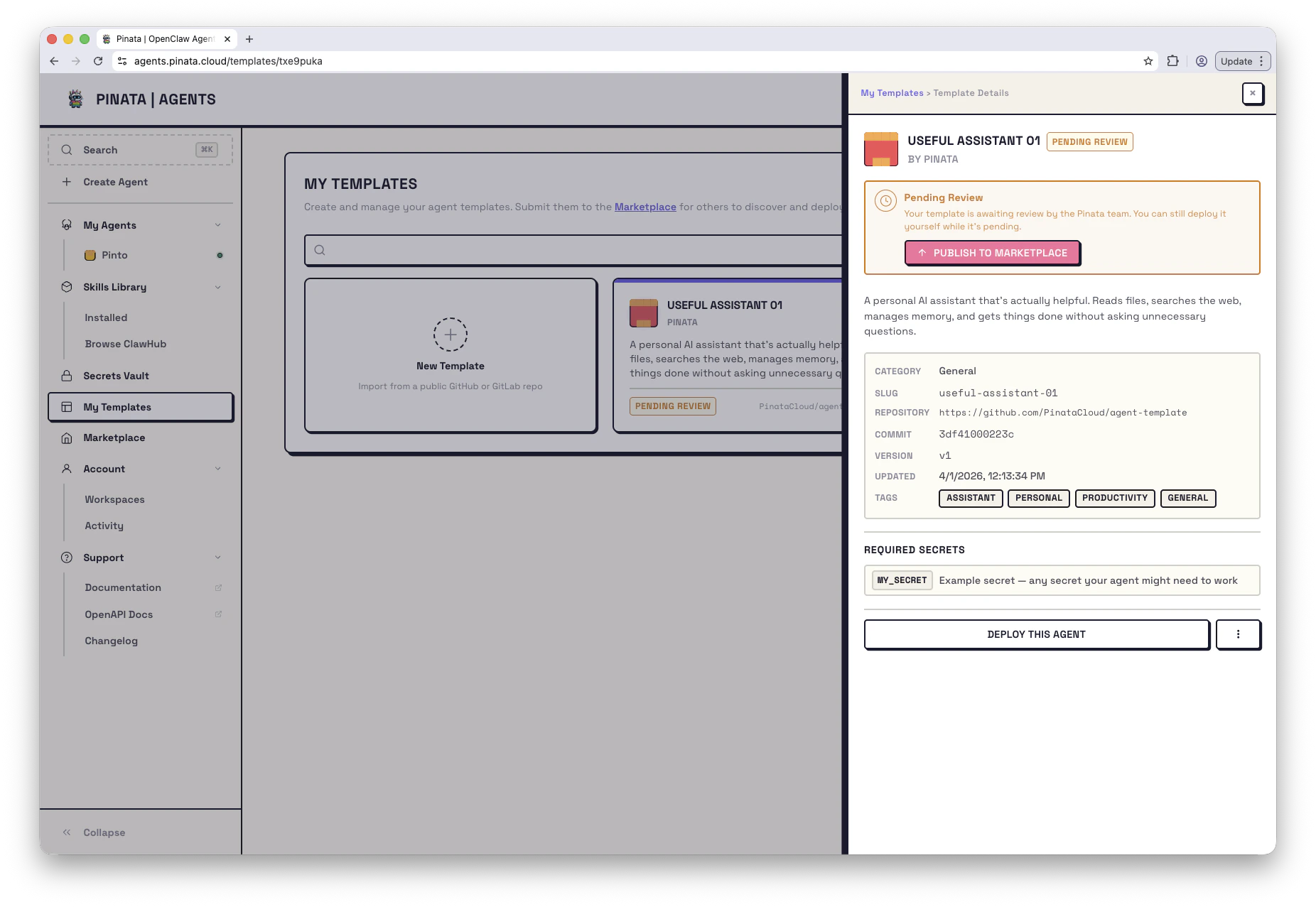 ## Submit to Marketplace (Optional)
Share your template with the community by submitting it for review.
**Via the UI:**
1. Go to [My Templates](https://agents.pinata.cloud/templates) → **+ New Template**
2. Enter your public repository URL
3. Click **Validate** to check for required files
4. Review the parsed manifest and workspace files
5. Click **Submit** to send for review
**Via the CLI:**
```bash theme={null}
# Validate your repo
pinata agents templates validate https://github.com/user/my-template
# Submit for review
pinata agents templates submit https://github.com/user/my-template
# Submit from a specific branch
pinata agents templates submit https://github.com/user/my-template --branch develop
```
Template status progression:
* **draft** → **pending\_review** → **published** (or **rejected**)
* Published templates can be **archived** (soft-deleted) and resubmitted later
## Managing Submissions
Track and update your templates in [**My Templates**](https://agents.pinata.cloud/templates) or via CLI:
```bash theme={null}
# List your submissions
pinata agents templates mine
# Update (re-pull from repo)
pinata agents templates update
# Archive a submission
pinata agents templates delete
```
## Paid Templates
Templates submitted with a paid tier use x402 micropayments for one-time purchase. Buyers pay before deploy; once paid, the template behaves like any other in their account.
Mark a template as paid in the `template` block of `manifest.json` - see the [manifest reference](/agents/manifest#template) for the full schema.
## Submit to Marketplace (Optional)
Share your template with the community by submitting it for review.
**Via the UI:**
1. Go to [My Templates](https://agents.pinata.cloud/templates) → **+ New Template**
2. Enter your public repository URL
3. Click **Validate** to check for required files
4. Review the parsed manifest and workspace files
5. Click **Submit** to send for review
**Via the CLI:**
```bash theme={null}
# Validate your repo
pinata agents templates validate https://github.com/user/my-template
# Submit for review
pinata agents templates submit https://github.com/user/my-template
# Submit from a specific branch
pinata agents templates submit https://github.com/user/my-template --branch develop
```
Template status progression:
* **draft** → **pending\_review** → **published** (or **rejected**)
* Published templates can be **archived** (soft-deleted) and resubmitted later
## Managing Submissions
Track and update your templates in [**My Templates**](https://agents.pinata.cloud/templates) or via CLI:
```bash theme={null}
# List your submissions
pinata agents templates mine
# Update (re-pull from repo)
pinata agents templates update
# Archive a submission
pinata agents templates delete
```
## Paid Templates
Templates submitted with a paid tier use x402 micropayments for one-time purchase. Buyers pay before deploy; once paid, the template behaves like any other in their account.
Mark a template as paid in the `template` block of `manifest.json` - see the [manifest reference](/agents/manifest#template) for the full schema.