> ## Documentation Index
> Fetch the complete documentation index at: https://docs.pinata.cloud/llms.txt
> Use this file to discover all available pages before exploring further.
# Midwest Blockathon
> Everything you need to start hacking with Pinata
 Welcome to the Pinata Midwest Blockathon cheat sheet! This doc will have everything you need to know about:
* Getting Started with Pinata
* Challenge and Prizes
* Tutorials and Guides
## What is Pinata?
Pinata makes decentralized file uploads easy for developers who need fast and zero-setup soltuions. Our primary product, the IPFS API and SDK, makes it as simple as one line of code to upload a file:
```typescript theme={null}
const { cid } = await pinata.upload.public.file(file)
// bafkreib4pqtikzdjlj4zigobmd63lig7u6oxlug24snlr6atjlmlza45dq
```
Retreiving files is just as easy!
```typescript theme={null}
const { data, contentType } = await pinata.gateways.public.get(
"bafkreib4pqtikzdjlj4zigobmd63lig7u6oxlug24snlr6atjlmlza45dq"
)
```
Built on years of experience with IPFS, Pinata has scaled companies to serve high volumes of requests and bandwidth, as well as developers who are just starting out. We want to help build the future of the web through decentralizedd applications!
## Pinata Challenge
Build the best use case of Pinata's APIs or SDKs in combination with blockchain. Pinata will judge based on:
* Real world usefulness of the app
* How integral Pinata was to building the app
* Extensive use of Pinata features
* Pure creativity used in the final product
## Prizes
## Quickstart
Almost all of our features are on the free account, but if you find yourself limited and need a paid account contact [steve@pinata.cloud](mailto:steve@pinata.cloud)
}
>
Quickstart
}
>
Quickstart
}
>
Quickstart
}
>
Quickstart
}
>
Quickstart
}
>
Quickstart
### 1. Get API key and Gateway URL
Welcome to the Pinata Midwest Blockathon cheat sheet! This doc will have everything you need to know about:
* Getting Started with Pinata
* Challenge and Prizes
* Tutorials and Guides
## What is Pinata?
Pinata makes decentralized file uploads easy for developers who need fast and zero-setup soltuions. Our primary product, the IPFS API and SDK, makes it as simple as one line of code to upload a file:
```typescript theme={null}
const { cid } = await pinata.upload.public.file(file)
// bafkreib4pqtikzdjlj4zigobmd63lig7u6oxlug24snlr6atjlmlza45dq
```
Retreiving files is just as easy!
```typescript theme={null}
const { data, contentType } = await pinata.gateways.public.get(
"bafkreib4pqtikzdjlj4zigobmd63lig7u6oxlug24snlr6atjlmlza45dq"
)
```
Built on years of experience with IPFS, Pinata has scaled companies to serve high volumes of requests and bandwidth, as well as developers who are just starting out. We want to help build the future of the web through decentralizedd applications!
## Pinata Challenge
Build the best use case of Pinata's APIs or SDKs in combination with blockchain. Pinata will judge based on:
* Real world usefulness of the app
* How integral Pinata was to building the app
* Extensive use of Pinata features
* Pure creativity used in the final product
## Prizes
## Quickstart
Almost all of our features are on the free account, but if you find yourself limited and need a paid account contact [steve@pinata.cloud](mailto:steve@pinata.cloud)
}
>
Quickstart
}
>
Quickstart
}
>
Quickstart
}
>
Quickstart
}
>
Quickstart
}
>
Quickstart
### 1. Get API key and Gateway URL
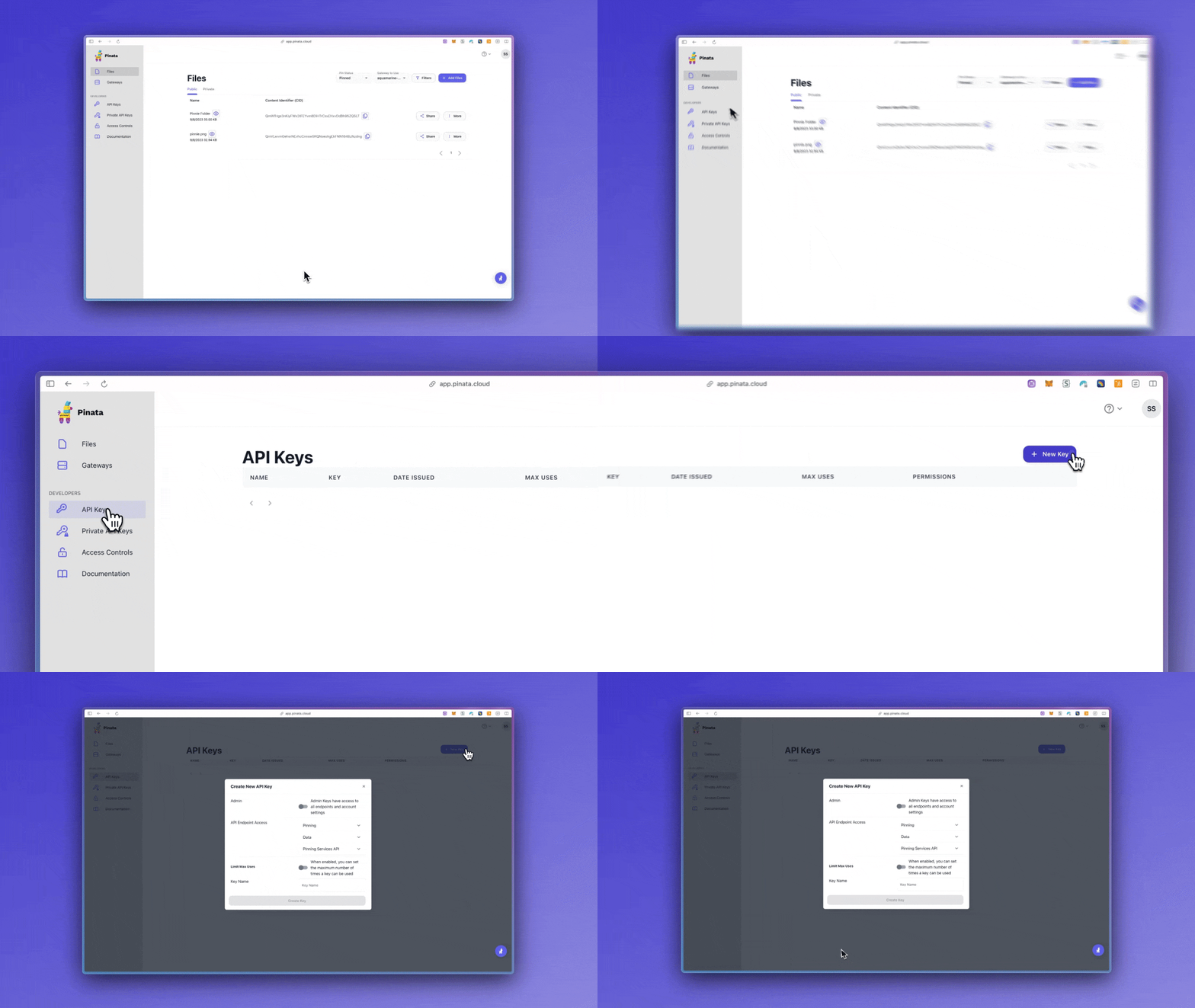 Inside the [Pinata App](https://app.pinata.cloud) select "API Keys" from the sidebar, then click "New Key" in the top right. We would recommend starting with Admin privileges and unlimited uses to start. You will receive a `pinata_api_key`, `pinata_api_secret`, and a `JWT`. The JWT is the most common authentication method and what we'll be using below.
Next you will want to grab your Gateway domain by clicking the Gateways tab in the sidebar. You should see it listed in the format `fun-llama-300.mypinata.cloud` and you will want to copy it exactly like that.
### 2. Install and Setup SDK
In the root of your project run the install command with your package manager of choice.
```bash npm theme={null}
npm i pinata
```
```bash pnpm theme={null}
pnpm i pinata
```
```bash yarn theme={null}
yarn add pinata
```
```bash bun theme={null}
bun i pinata
```
Import and initialize the SDK in your codebase with the API key and Gateway from the previous step
```typescript theme={null}
import { PinataSDK } from "pinata";
const pinata = new PinataSDK({
pinataJwt: "PINATA_JWT",
pinataGateway: "example-gateway.mypinata.cloud",
});
```
The `PINATA_JWT` is a secret key, be sure to initialize the SDK in a secure environment and practice basic variable security practices. If you need to upload from a client environment, consider using signed JWTs
### 3. Upload a File
Use the `upload` method to upload a File object.
```typescript SDK theme={null}
import { PinataSDK } from "pinata";
const pinata = new PinataSDK({
pinataJwt: process.env.PINATA_JWT!,
pinataGateway: "example-gateway.mypinata.cloud",
});
async function main() {
try {
const file = new File(["hello"], "Testing.txt", { type: "text/plain" });
const upload = await pinata.upload.public.file(file);
console.log(upload);
} catch (error) {
console.log(error);
}
}
await main();
```
```typescript API theme={null}
const JWT = "PINATA_JWT";
async function uploadFile() {
try {
const file = new File(["Hello World!"], "hello-world.txt");
const data = new FormData();
data.append("file", file);
data.append("network", "public");
const request = await fetch(
"https://uploads.pinata.cloud/v3/files",
{
method: "POST",
headers: {
Authorization: `Bearer ${JWT}`,
},
body: data,
}
);
const response = await request.json();
console.log(response);
} catch (error) {
console.log(error);
}
}
await pinFileToIPFS();
```
You should get a response object like the one below
```typescript SDK theme={null}
{
id: "349f1bb2-5d59-4cab-9966-e94c028a05b7",
name: "file.txt",
cid: "bafybeihgxdzljxb26q6nf3r3eifqeedsvt2eubqtskghpme66cgjyw4fra",
size: 4682779,
number_of_files: 1,
mime_type: "text/plain",
group_id: null
}
```
```typescript API theme={null}
{
data: {
id: "349f1bb2-5d59-4cab-9966-e94c028a05b7",
name: "file.txt",
cid: "bafybeihgxdzljxb26q6nf3r3eifqeedsvt2eubqtskghpme66cgjyw4fra",
size: 4682779,
number_of_files: 1,
mime_type: "text/plain",
group_id: null
}
}
```
The unique thing about IPFS is the CID (IpfsHash) or Content Identifier. Its a unique hash based on the content ofthe file.
### 4. Retrieve a File through a Gateway
Use the `cid` of a file to fetch it through a Gateway or create a URL
```typescript SDK theme={null}
import { PinataSDK } from "pinata";
const pinata = new PinataSDK({
pinataJwt: process.env.PINATA_JWT!,
pinataGateway: "example-gateway.mypinata.cloud",
});
async function main() {
try {
const data = await pinata.gateways.public.get(
"bafkreibm6jg3ux5qumhcn2b3flc3tyu6dmlb4xa7u5bf44yegnrjhc4yeq"
);
console.log(data)
const url = await pinata.gateways.public.convert(
"bafkreib4pqtikzdjlj4zigobmd63lig7u6oxlug24snlr6atjlmlza45dq",
)
console.log(url)
} catch (error) {
console.log(error);
}
}
main();
```
```typescript API theme={null}
const JWT = "YOUR_PINATA_JWT";
async function url() {
try {
const gateway = "example.mypinata.cloud"
const cid = "bafkreib4pqtikzdjlj4zigobmd63lig7u6oxlug24snlr6atjlmlza45dq"
const url = `https://${gateway}/ipfs/${cid}`
console.log(url)
} catch (error) {
console.log(error);
}
}
```
## Example Apps
Built specially for UGA Hacks, thedappbook is an example of a fullstack decentralized application.
One big wall of posts using Ethereum and IPFS through Pinata
Smart contract handles creating posts and records data to the blockchain, including the author's wallet address, the offchain IPFS URI, and the timestamp of the post.
Client allows a user to connect their wallet and write on the wall. Each post has a message and an optional image which are both uploaded to Pinata as a json file. Returned is an IPFS URL that is stored on the contract to optimize space
Server provides an API endpoint where the client can get a temporary Pinata API key to handle uploads so our admin API key is not exposed on the client.
## Tutorials
## Need Help?
We got troops on the ground! 🫡 Come find us at our table or shoot us an email!
Head of Developer Relations, Resident Hillbilly
Email: [steve@pinata.cloud](mailto:steve@pinata.cloud)
Inside the [Pinata App](https://app.pinata.cloud) select "API Keys" from the sidebar, then click "New Key" in the top right. We would recommend starting with Admin privileges and unlimited uses to start. You will receive a `pinata_api_key`, `pinata_api_secret`, and a `JWT`. The JWT is the most common authentication method and what we'll be using below.
Next you will want to grab your Gateway domain by clicking the Gateways tab in the sidebar. You should see it listed in the format `fun-llama-300.mypinata.cloud` and you will want to copy it exactly like that.
### 2. Install and Setup SDK
In the root of your project run the install command with your package manager of choice.
```bash npm theme={null}
npm i pinata
```
```bash pnpm theme={null}
pnpm i pinata
```
```bash yarn theme={null}
yarn add pinata
```
```bash bun theme={null}
bun i pinata
```
Import and initialize the SDK in your codebase with the API key and Gateway from the previous step
```typescript theme={null}
import { PinataSDK } from "pinata";
const pinata = new PinataSDK({
pinataJwt: "PINATA_JWT",
pinataGateway: "example-gateway.mypinata.cloud",
});
```
The `PINATA_JWT` is a secret key, be sure to initialize the SDK in a secure environment and practice basic variable security practices. If you need to upload from a client environment, consider using signed JWTs
### 3. Upload a File
Use the `upload` method to upload a File object.
```typescript SDK theme={null}
import { PinataSDK } from "pinata";
const pinata = new PinataSDK({
pinataJwt: process.env.PINATA_JWT!,
pinataGateway: "example-gateway.mypinata.cloud",
});
async function main() {
try {
const file = new File(["hello"], "Testing.txt", { type: "text/plain" });
const upload = await pinata.upload.public.file(file);
console.log(upload);
} catch (error) {
console.log(error);
}
}
await main();
```
```typescript API theme={null}
const JWT = "PINATA_JWT";
async function uploadFile() {
try {
const file = new File(["Hello World!"], "hello-world.txt");
const data = new FormData();
data.append("file", file);
data.append("network", "public");
const request = await fetch(
"https://uploads.pinata.cloud/v3/files",
{
method: "POST",
headers: {
Authorization: `Bearer ${JWT}`,
},
body: data,
}
);
const response = await request.json();
console.log(response);
} catch (error) {
console.log(error);
}
}
await pinFileToIPFS();
```
You should get a response object like the one below
```typescript SDK theme={null}
{
id: "349f1bb2-5d59-4cab-9966-e94c028a05b7",
name: "file.txt",
cid: "bafybeihgxdzljxb26q6nf3r3eifqeedsvt2eubqtskghpme66cgjyw4fra",
size: 4682779,
number_of_files: 1,
mime_type: "text/plain",
group_id: null
}
```
```typescript API theme={null}
{
data: {
id: "349f1bb2-5d59-4cab-9966-e94c028a05b7",
name: "file.txt",
cid: "bafybeihgxdzljxb26q6nf3r3eifqeedsvt2eubqtskghpme66cgjyw4fra",
size: 4682779,
number_of_files: 1,
mime_type: "text/plain",
group_id: null
}
}
```
The unique thing about IPFS is the CID (IpfsHash) or Content Identifier. Its a unique hash based on the content ofthe file.
### 4. Retrieve a File through a Gateway
Use the `cid` of a file to fetch it through a Gateway or create a URL
```typescript SDK theme={null}
import { PinataSDK } from "pinata";
const pinata = new PinataSDK({
pinataJwt: process.env.PINATA_JWT!,
pinataGateway: "example-gateway.mypinata.cloud",
});
async function main() {
try {
const data = await pinata.gateways.public.get(
"bafkreibm6jg3ux5qumhcn2b3flc3tyu6dmlb4xa7u5bf44yegnrjhc4yeq"
);
console.log(data)
const url = await pinata.gateways.public.convert(
"bafkreib4pqtikzdjlj4zigobmd63lig7u6oxlug24snlr6atjlmlza45dq",
)
console.log(url)
} catch (error) {
console.log(error);
}
}
main();
```
```typescript API theme={null}
const JWT = "YOUR_PINATA_JWT";
async function url() {
try {
const gateway = "example.mypinata.cloud"
const cid = "bafkreib4pqtikzdjlj4zigobmd63lig7u6oxlug24snlr6atjlmlza45dq"
const url = `https://${gateway}/ipfs/${cid}`
console.log(url)
} catch (error) {
console.log(error);
}
}
```
## Example Apps
Built specially for UGA Hacks, thedappbook is an example of a fullstack decentralized application.
One big wall of posts using Ethereum and IPFS through Pinata
Smart contract handles creating posts and records data to the blockchain, including the author's wallet address, the offchain IPFS URI, and the timestamp of the post.
Client allows a user to connect their wallet and write on the wall. Each post has a message and an optional image which are both uploaded to Pinata as a json file. Returned is an IPFS URL that is stored on the contract to optimize space
Server provides an API endpoint where the client can get a temporary Pinata API key to handle uploads so our admin API key is not exposed on the client.
## Tutorials
## Need Help?
We got troops on the ground! 🫡 Come find us at our table or shoot us an email!
Head of Developer Relations, Resident Hillbilly
Email: [steve@pinata.cloud](mailto:steve@pinata.cloud)

CEO, Vibe Dreamer
Email: No email, v exclusive, find the cowboy hat to chat
