> ## Documentation Index
> Fetch the complete documentation index at: https://docs.pinata.cloud/llms.txt
> Use this file to discover all available pages before exploring further.
# Hot Swaps
> Use the Hot Swaps plugin to make one CID map to another
The Hot Swaps plugin can be used to "redirect" a CID to another CID. This can be useful when you need to replace content without updaing the CID hash. What makes this unique from just replacing content is that every swap is recorded and is available as a history. Combine that with the content addressable nature of CIDs and you get a version history of content.
To demonstrate how this plugin works, consider the following example:
```typescript theme={null}
import { PinataSDK } from "pinata";
const pinata = new PinataSDK({
pinataJwt: process.env.PINATA_JWT!,
pinataGateway: "example.mypinata.cloud", // Gateway has Hot Swaps installed
});
async function main() {
try {
// Upload the first file
const file = new File(["The original CID"], "cid.txt", {
type: "text/plain",
});
const { cid: CID1 } = await pinata.upload.file(file);
console.log("This is the original CID hash: ", CID1);
// Upload a second file
const file2 = new File(["The new CID"], "cid.txt", { type: "text/plain" });
const { cid: CID2 } = await pinata.upload.file(file2);
console.log("This is the new CID hash: ", CID2);
// Create the swap, so when we visit CID1 we will get the content of CID2
const swap = await pinata.files.addSwap({
cid: CID1,
swapCid: CID2,
});
console.log("Swap created: ", swap);
// Fetch CID1 through our gateway that has Hot Swaps installed, get the content of CID2
const data = await pinata.gateways.get(CID1);
console.log("Result of requestingt CID1 through the gateway: ", data);
} catch (error) {
console.log(error);
}
}
main();
```
## Installation
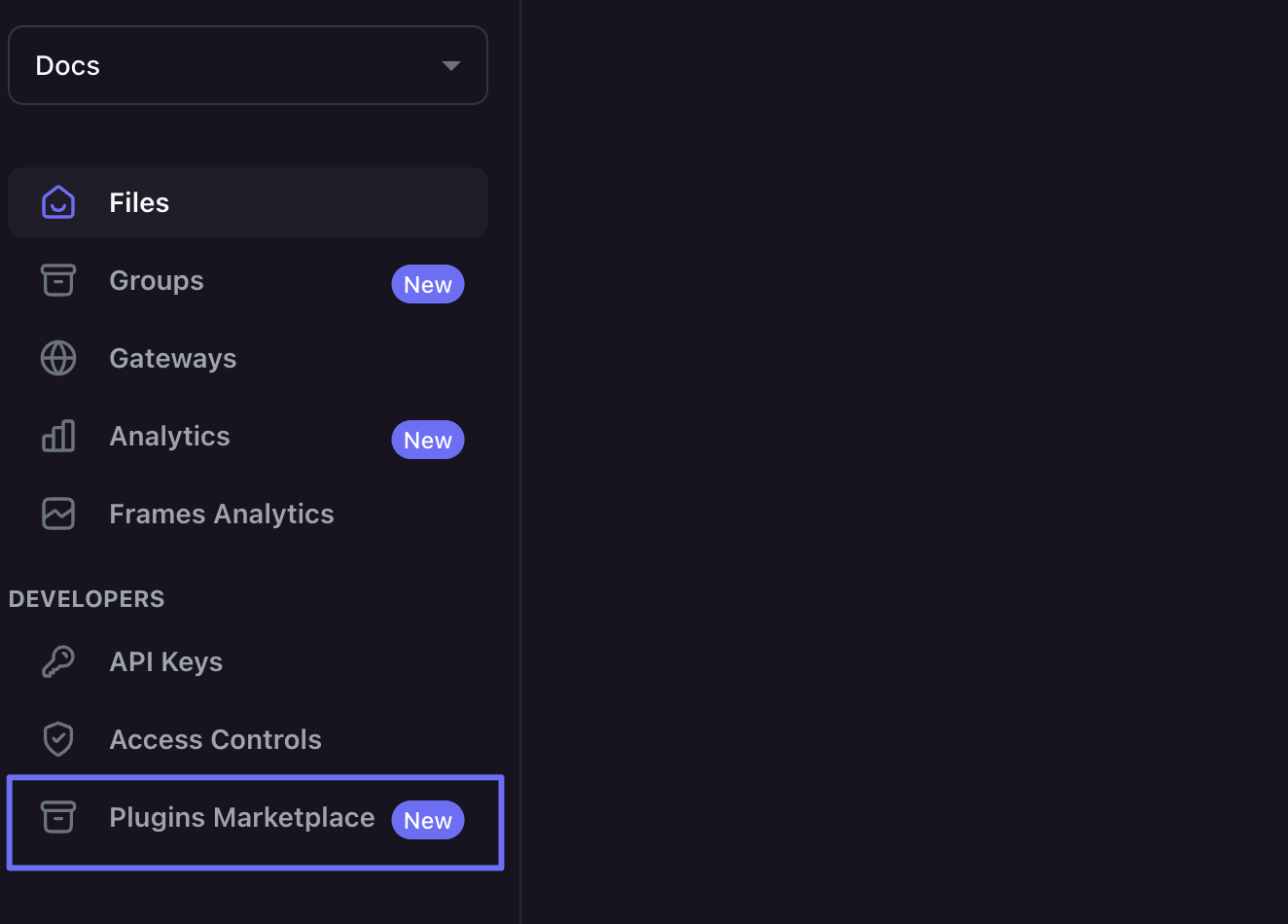
To install a plugin navigate to the Plugins Marketplace tab on the right side.
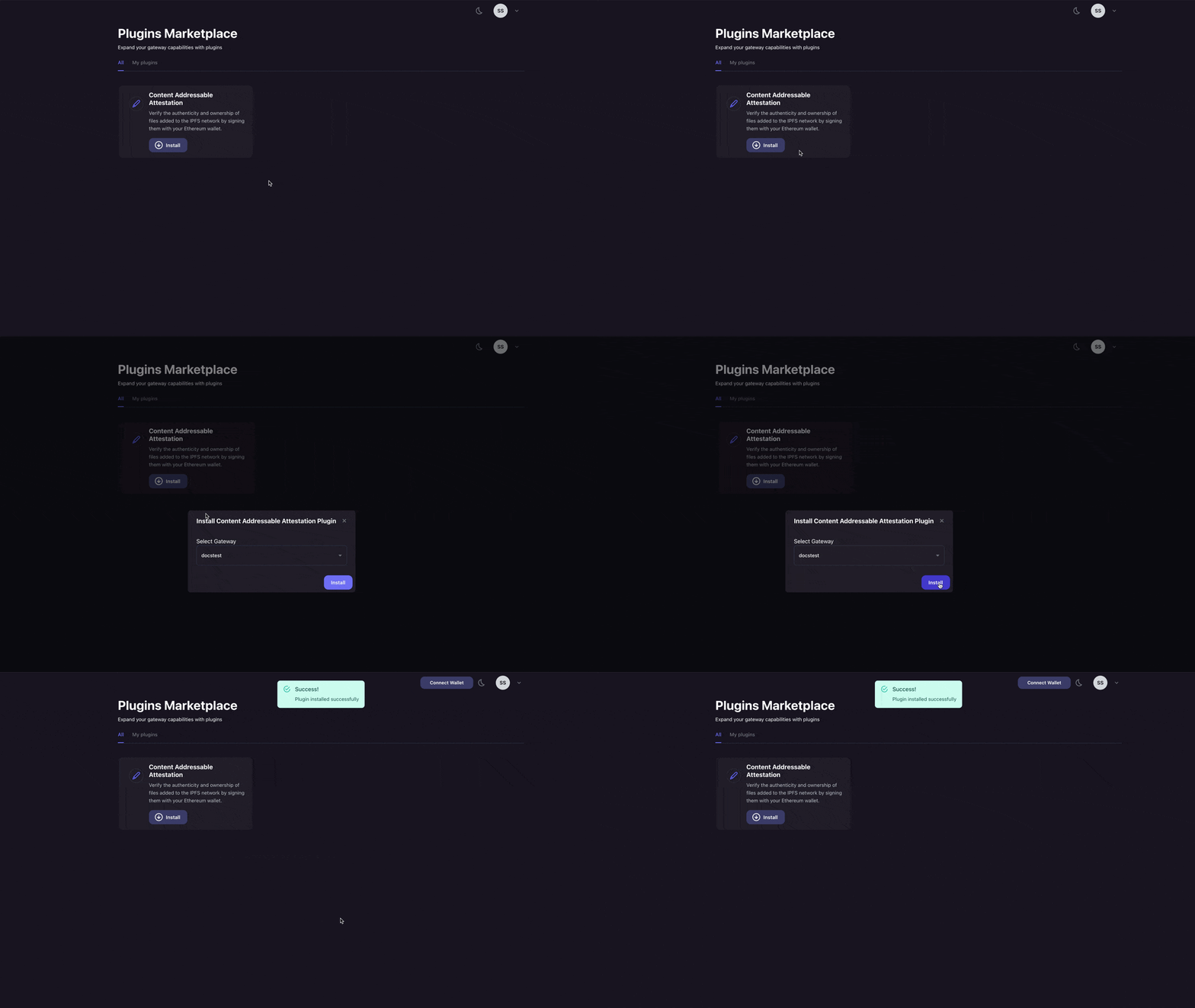
 Once there you can find the plugin you want to install and click "Install." This will bring up a drop down of your Gateways to choose which the plugin is installed to.
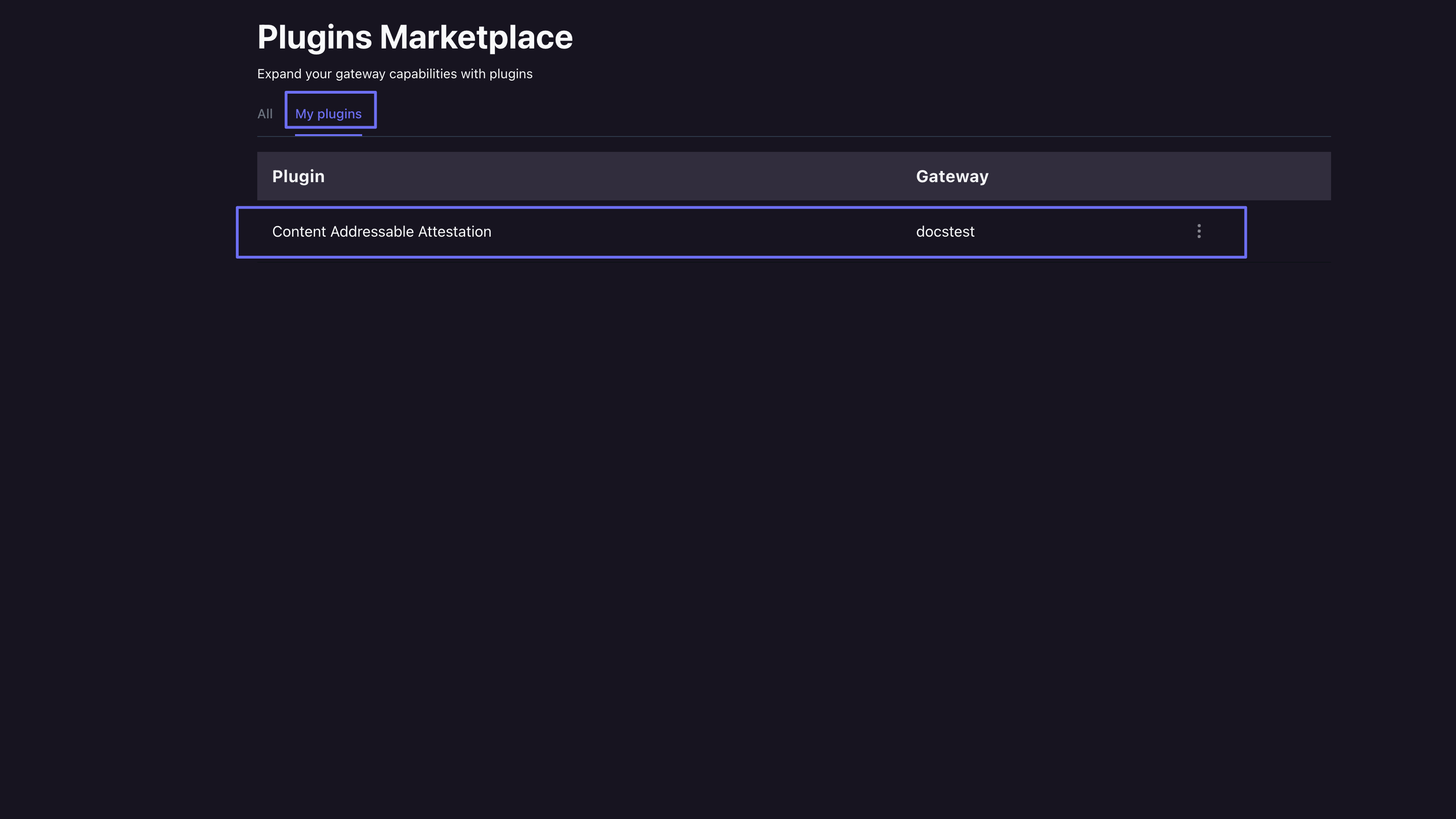
 Once installed you can confirm its there by going to the "My Plugins" tab.
 ## Usage
After installing the plugin you can then make CID swaps and have them reflect when making Gateway requests. The first parameter `cid` will be the original CID, and `swapCid` will be the content you want it to point to instead.
```typescript SDK {8-11} theme={null}
import { PinataSDK } from "pinata";
const pinata = new PinataSDK({
pinataJwt: process.env.PINATA_JWT!,
pinataGateway: "example-gateway.mypinata.cloud",
});
const swap = await pinata.files.addSwap({
cid: "bafkreibbvdqf5ekc2crouowv7vtjbcmbjoiysegslmmqc6jrxbaa43xske",
swapCid: "bafkreihumyr3bgxulu45ghws33xokwjm5o7xnkkgakaz66ldtylwiecnhu"
})
```
```typescript API {6,8,10-12} theme={null}
const JWT = "YOUR_PINATA_JWT";
async function swap() {
try {
const cid = "bafkreibbvdqf5ekc2crouowv7vtjbcmbjoiysegslmmqc6jrxbaa43xske"
const url = `https://api.pinata.cloud/v3/files/swap/${cid}`
const payload = JSON.stringify({
swapCid: "bafkreihumyr3bgxulu45ghws33xokwjm5o7xnkkgakaz66ldtylwiecnhu"
})
const request = await fetch(url, {
method: "POST",
headers: {
"Content-Type": "application/json",
Authorization: `Bearer ${JWT}`,
},
body: payload
});
const response = await request.json();
console.log(response);
} catch (error) {
console.log(error);
}
}
```
You can fetch the history of CID swaps using the `getSwapHistory` method, passing in the `cid` of the original CID and the `domain` of the gateway that has the Hot Swaps plugin installed.
```typescript SDK theme={null}
const history = await pinata.files.getSwapHistory({
cid: "bafkreibbvdqf5ekc2crouowv7vtjbcmbjoiysegslmmqc6jrxbaa43xske",
domain: "discordpinnie.mypinata.cloud"
})
```
```typescript API {6,8,10} theme={null}
const JWT = "YOUR_PINATA_JWT";
async function swap() {
try {
const cid = "bafkreibbvdqf5ekc2crouowv7vtjbcmbjoiysegslmmqc6jrxbaa43xske"
const query = "?domain=discordpinnie.mypinata.cloud"
const url = `https://api.pinata.cloud/v3/files/swap/${cid}` + query
const request = await fetch(url, {
method: "GET",
headers: {
Authorization: `Bearer ${JWT}`,
},
body: payload
});
const response = await request.json();
console.log(response);
} catch (error) {
console.log(error);
}
}
```
The response will show a history of the CID and domain in question
```typescript SDK theme={null}
{
data: [
{
mapped_cid: "bafkreihumyr3bgxulu45ghws33xokwjm5o7xnkkgakaz66ldtylwiecnhu",
created_at: "2024-08-19T14:34:46.492432Z"
},
{ mapped_cid: null, created_at: "2024-08-19T14:25:10.208726Z" },
{
mapped_cid: "bafkreihumyr3bgxulu45ghws33xokwjm5o7xnkkgakaz66ldtylwiecnhu",
created_at: "2024-08-19T00:23:41.755206Z"
}
]
}
```
```json API theme={null}
{
"data": [
{
"mapped_cid": "bafkreihumyr3bgxulu45ghws33xokwjm5o7xnkkgakaz66ldtylwiecnhu",
"created_at": "2024-08-19T14:34:46.492432Z"
},
{ "mapped_cid": null, "created_at": "2024-08-19T14:25:10.208726Z" },
{
"mapped_cid": "bafkreihumyr3bgxulu45ghws33xokwjm5o7xnkkgakaz66ldtylwiecnhu",
"created_at": "2024-08-19T00:23:41.755206Z"
}
]
}
```
To delete a CID swap you can simply use the `deleteSwap` method and pass in the CID.
```typescript theme={null}
const deleteSwap = await pinata.gateways.deleteSwap(
"bafkreibbvdqf5ekc2crouowv7vtjbcmbjoiysegslmmqc6jrxbaa43xske"
)
```
```typescript API {6,8} theme={null}
const JWT = "YOUR_PINATA_JWT";
async function swap() {
try {
const cid = "bafkreibbvdqf5ekc2crouowv7vtjbcmbjoiysegslmmqc6jrxbaa43xske"
const url = `https://api.pinata.cloud/v3/files/swap/${cid}`
const request = await fetch(url, {
method: "DELETE",
headers: {
Authorization: `Bearer ${JWT}`,
},
body: payload
});
const response = await request.json();
console.log(response);
} catch (error) {
console.log(error);
}
}
```
## Usage
After installing the plugin you can then make CID swaps and have them reflect when making Gateway requests. The first parameter `cid` will be the original CID, and `swapCid` will be the content you want it to point to instead.
```typescript SDK {8-11} theme={null}
import { PinataSDK } from "pinata";
const pinata = new PinataSDK({
pinataJwt: process.env.PINATA_JWT!,
pinataGateway: "example-gateway.mypinata.cloud",
});
const swap = await pinata.files.addSwap({
cid: "bafkreibbvdqf5ekc2crouowv7vtjbcmbjoiysegslmmqc6jrxbaa43xske",
swapCid: "bafkreihumyr3bgxulu45ghws33xokwjm5o7xnkkgakaz66ldtylwiecnhu"
})
```
```typescript API {6,8,10-12} theme={null}
const JWT = "YOUR_PINATA_JWT";
async function swap() {
try {
const cid = "bafkreibbvdqf5ekc2crouowv7vtjbcmbjoiysegslmmqc6jrxbaa43xske"
const url = `https://api.pinata.cloud/v3/files/swap/${cid}`
const payload = JSON.stringify({
swapCid: "bafkreihumyr3bgxulu45ghws33xokwjm5o7xnkkgakaz66ldtylwiecnhu"
})
const request = await fetch(url, {
method: "POST",
headers: {
"Content-Type": "application/json",
Authorization: `Bearer ${JWT}`,
},
body: payload
});
const response = await request.json();
console.log(response);
} catch (error) {
console.log(error);
}
}
```
You can fetch the history of CID swaps using the `getSwapHistory` method, passing in the `cid` of the original CID and the `domain` of the gateway that has the Hot Swaps plugin installed.
```typescript SDK theme={null}
const history = await pinata.files.getSwapHistory({
cid: "bafkreibbvdqf5ekc2crouowv7vtjbcmbjoiysegslmmqc6jrxbaa43xske",
domain: "discordpinnie.mypinata.cloud"
})
```
```typescript API {6,8,10} theme={null}
const JWT = "YOUR_PINATA_JWT";
async function swap() {
try {
const cid = "bafkreibbvdqf5ekc2crouowv7vtjbcmbjoiysegslmmqc6jrxbaa43xske"
const query = "?domain=discordpinnie.mypinata.cloud"
const url = `https://api.pinata.cloud/v3/files/swap/${cid}` + query
const request = await fetch(url, {
method: "GET",
headers: {
Authorization: `Bearer ${JWT}`,
},
body: payload
});
const response = await request.json();
console.log(response);
} catch (error) {
console.log(error);
}
}
```
The response will show a history of the CID and domain in question
```typescript SDK theme={null}
{
data: [
{
mapped_cid: "bafkreihumyr3bgxulu45ghws33xokwjm5o7xnkkgakaz66ldtylwiecnhu",
created_at: "2024-08-19T14:34:46.492432Z"
},
{ mapped_cid: null, created_at: "2024-08-19T14:25:10.208726Z" },
{
mapped_cid: "bafkreihumyr3bgxulu45ghws33xokwjm5o7xnkkgakaz66ldtylwiecnhu",
created_at: "2024-08-19T00:23:41.755206Z"
}
]
}
```
```json API theme={null}
{
"data": [
{
"mapped_cid": "bafkreihumyr3bgxulu45ghws33xokwjm5o7xnkkgakaz66ldtylwiecnhu",
"created_at": "2024-08-19T14:34:46.492432Z"
},
{ "mapped_cid": null, "created_at": "2024-08-19T14:25:10.208726Z" },
{
"mapped_cid": "bafkreihumyr3bgxulu45ghws33xokwjm5o7xnkkgakaz66ldtylwiecnhu",
"created_at": "2024-08-19T00:23:41.755206Z"
}
]
}
```
To delete a CID swap you can simply use the `deleteSwap` method and pass in the CID.
```typescript theme={null}
const deleteSwap = await pinata.gateways.deleteSwap(
"bafkreibbvdqf5ekc2crouowv7vtjbcmbjoiysegslmmqc6jrxbaa43xske"
)
```
```typescript API {6,8} theme={null}
const JWT = "YOUR_PINATA_JWT";
async function swap() {
try {
const cid = "bafkreibbvdqf5ekc2crouowv7vtjbcmbjoiysegslmmqc6jrxbaa43xske"
const url = `https://api.pinata.cloud/v3/files/swap/${cid}`
const request = await fetch(url, {
method: "DELETE",
headers: {
Authorization: `Bearer ${JWT}`,
},
body: payload
});
const response = await request.json();
console.log(response);
} catch (error) {
console.log(error);
}
}
```