> ## Documentation Index
> Fetch the complete documentation index at: https://docs.pinata.cloud/llms.txt
> Use this file to discover all available pages before exploring further.
# Key-Values
A unique and powerful feature included with the IPFS API and Private IPFS API is the key-value store. Anytime you upload or update a file you can store up to 10 key-value pairs.
```typescript SDK {3-6} theme={null}
const upload = await pinata.upload.public
.file(file)
.keyvalues({
env: "prod",
userId: "abc123"
})
```
```typescript API {13-18,20} theme={null}
const JWT = "YOUR_PINATA_JWT";
async function upload() {
try {
const formData = new FormData();
const file = new File(["hello"], "Testing.txt", { type: "text/plain" });
formData.append("file", file);
formData.append("network", "public")
const keyvalues = JSON.stringify({
keyvalues: {
env: "prod",
userId: "abc123"
}
})
formData.append("keyvalues", keyvalues)
const request = await fetch("https://uploads.pinata.cloud/v3/files", {
method: "POST",
headers: {
Authorization: `Bearer ${JWT}`,
},
body: formData,
});
const response = await request.json();
console.log(response);
} catch (error) {
console.log(error);
}
}
```
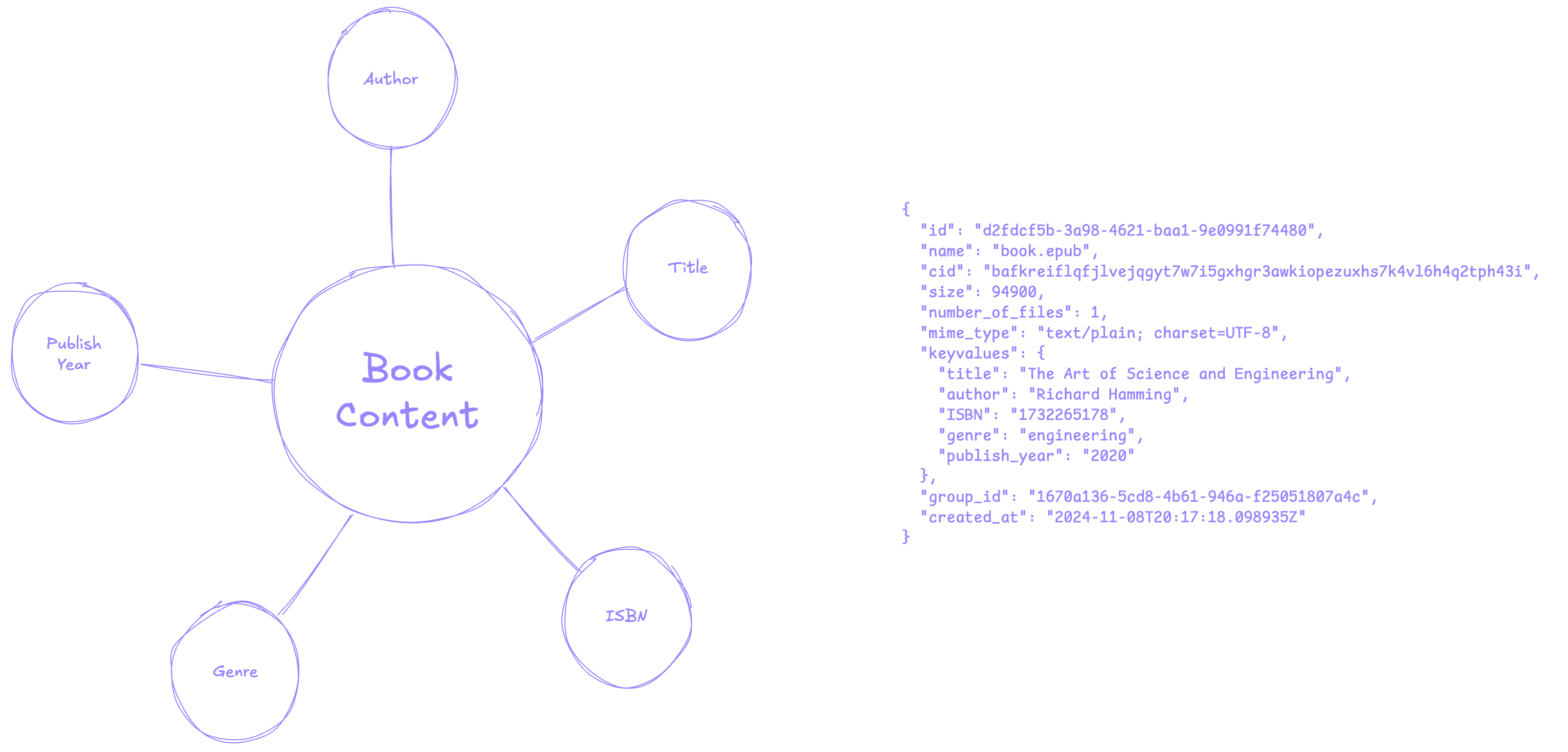
This small yet powerful feature allows you to remove the need for an external database in most cases. We like to call this paradigm **[File-Centric Architecture](https://pinata.cloud/blog/using-file-centric-architecture-to-build-simple-and-capable-apps/)**, where apps and their structure revolves around the files themselves. This creates a molecule like structure and keeps the data related to the file close by.
## Creating
Creating a new key-value for a file can be done in two ways:
### Uploading a File
By including the key-values as part of the upload [method](/sdk/upload/public/file) or [endpoint](/api-reference/endpoint/upload-a-file) and the file and the key-values will be created at the same time.
```typescript SDK {3-8} theme={null}
const upload = await pinata.upload.public
.file(file)
.keyvalues({
env: "prod",
userId: "abc123"
})
```
```typescript API {13-18,20} theme={null}
const JWT = "YOUR_PINATA_JWT";
async function upload() {
try {
const formData = new FormData();
const file = new File(["hello"], "Testing.txt", { type: "text/plain" });
formData.append("file", file);
formData.append("network", "public");
const keyvalues = JSON.stringify({
keyvalues: {
env: "prod",
userId: "abc123"
}
})
formData.append("keyvalues", keyvalues)
const request = await fetch("https://uploads.pinata.cloud/v3/files", {
method: "POST",
headers: {
Authorization: `Bearer ${JWT}`,
},
body: formData,
});
const response = await request.json();
console.log(response);
} catch (error) {
console.log(error);
}
}
```
### Updating an Existing File
If you've already uploaded a file and want to add a key-value you can do so with the update [method](/sdk/files/public/update) or [endpoint](/api-reference/endpoint/update-file).
```typescript SDK {3-7} theme={null}
const update = await pinata.files.public.update({
id: "2b4ee88d-1032-4e4e-a373-97d1ab127f16", // Target File ID
keyvalues: {
env: "prod",
userId: "abc123"
}
})
```
```typescript API {6,8-13,15-21} theme={null}
const JWT = "YOUR_PINATA_JWT";
async function update() {
try {
const fileId = "2b4ee88d-1032-4e4e-a373-97d1ab127f16"
const data = JSON.stringify({
keyvalues: {
env: "prod",
userId: "abc123"
}
})
const request = await fetch(`https://api.pinata.cloud/v3/files/public/${fileId}`, {
method: "PUT",
headers: {
Authorization: `Bearer ${JWT}`,
},
body: data,
});
const response = await request.json();
console.log(response);
} catch (error) {
console.log(error);
}
}
```
## Retrieving
Since key-values exist with files, you can retrieve them by listing files either through the SDK [method](/sdk/files/public/list) or API [endpoint](/api-reference/endpoint/list-files), and filtering results by key-value. The operator will always be `===`.
You can chain multiple key-value queries together and it will only return files that meet both values.
```typescript SDK {3-5} theme={null}
const files = await pinata.files.public
.list()
.keyvalues({
user: "abc123"
})
```
```typescript API {5} theme={null}
const JWT = "YOUR_PINATA_JWT";
async function list() {
try {
const request = await fetch(`https://api.pinata.cloud/v3/files/public?metadata[user]=123`, {
method: "GET",
headers: {
Authorization: `Bearer ${JWT}`,
}
});
const response = await request.json();
console.log(response);
} catch (error) {
console.log(error);
}
}
```
## Updating
The key-value system will automatically detect if you are replacing an existing value for a given key. For example, if you have a key of `env` with a value of `prod`, if you make an update of `env: "dev"` it will replace the old value. If the key does not exist then it will make a new key-value entry.
```typescript SDK {4} theme={null}
const update = await pinata.files.public.update({
id: "2b4ee88d-1032-4e4e-a373-97d1ab127f16", // Target File ID
keyvalues: {
env: "dev", // Previously `prod`
}
})
```
```typescript API {10} theme={null}
const JWT = "YOUR_PINATA_JWT";
async function update() {
try {
const fileId = "2b4ee88d-1032-4e4e-a373-97d1ab127f16"
const data = JSON.stringify({
keyvalues: {
env: "dev", // Previously `prod`
}
})
const request = await fetch(`https://api.pinata.cloud/v3/files/public/${fileId}`, {
method: "PUT",
headers: {
Authorization: `Bearer ${JWT}`,
},
body: data,
});
const response = await request.json();
console.log(response);
} catch (error) {
console.log(error);
}
}
```
## Deleting
You can remove a key-value entry by making the value `null`.
```typescript SDK {4} theme={null}
const update = await pinata.files.public.update({
id: "2b4ee88d-1032-4e4e-a373-97d1ab127f16", // Target File ID
keyvalues: {
env: null, // Deletes the `env` key-value entry
}
})
```
```typescript API {6,8-13,15-21} theme={null}
const JWT = "YOUR_PINATA_JWT";
async function update() {
try {
const fileId = "2b4ee88d-1032-4e4e-a373-97d1ab127f16"
const data = JSON.stringify({
keyvalues: {
env: null, // Deletes the `env` key-value entry
}
})
const request = await fetch(`https://api.pinata.cloud/v3/files/public/${fileId}`, {
method: "PUT",
headers: {
Authorization: `Bearer ${JWT}`,
},
body: data,
});
const response = await request.json();
console.log(response);
} catch (error) {
console.log(error);
}
}
```
## Further Reading
Check out some of our reading material on some of the possibilities of key-values and file-centric architecture!