> ## Documentation Index
> Fetch the complete documentation index at: https://docs.pinata.cloud/llms.txt
> Use this file to discover all available pages before exploring further.
# Migrating from NFT.Storage
> A comprehensive guide for migrating to Pinata from NFT.Storage for pinning files
As of June 30th, 2024 NFT.Storage will be discontinuing their classic product that allows files uploads. This guide is written as a service to help anyone who still needs uploads to migrate to Pinata.
## API/SDK Uploads
Please refer to the code guides below showing how you can migrate your exising NFT.Storage code to using the [Pinata API](/api-reference/introduction).
We are currently rewriting our SDK to make uploads outside of readable streams much easier, [please stay tunned](https://warpcast.com/~/channel/pinata)!
### Uploading Blob or File Objects
```javascript NFT.Ntorage theme={null}
async function nftStorage() {
const text = "hello world!";
const blob = new Blob([text], { type: "text/plain" });
const cid = await client.storeBlob(blob);
console.log(cid);
}
```
```javascript Pinata theme={null}
async function pinataBlob() {
const text = "Hello World!";
const blob = new Blob([text], { type: "text/plain" });
const file = new File([blob], "hello_world.txt");
const data = new FormData();
data.append("file", file);
const res = await fetch("https://api.pinata.cloud/pinning/pinFileToIPFS", {
method: "POST",
headers: {
Authorization: `Bearer ${JWT}`,
},
body: data,
});
const resData = await res.json();
console.log(resData);
}
```
### Uploading a Directory
```javascript NFT.Storage theme={null}
async function nftStorageDirectory() {
const cid = await client.storeDirectory([
new File(["hello world"], "hello.txt"),
new File([JSON.stringify({ from: "incognito" }, null, 2)], "metadata.json"),
]);
console.log(cid);
}
```
```javascript Pinata theme={null}
async function pinataDirectory() {
const folder = "my_folder";
const files = [
new File(["hello world"], "hello.txt"),
new File([JSON.stringify({ from: "incognito" }, null, 2)], "metadata.json"),
];
const data = new FormData();
Array.from(files).forEach((file) => {
data.append("file", file, `${folder}/${file.name}`);
});
const res = await fetch("https://api.pinata.cloud/pinning/pinFileToIPFS", {
method: "POST",
headers: {
Authorization: `Bearer ${JWT}`,
},
body: data,
});
const resData = await res.json();
console.log(resData);
}
```
### Uploading NFT Metadata
```javascript NFT.Storage theme={null}
async function nftStorageMetadata() {
const metadata = await client.store({
name: "nft.storage store test",
description: "Test ERC-1155 compatible metadata.",
image: new File(["hello world"], "hello.txt", { type: "image/png" }),
properties: {
custom: "Custom data can appear here, files are auto uploaded.",
file: new File(["This is a readme"], "README.md", { type: "text/plain" }),
},
});
console.log("IPFS URL for the metadata:", metadata.url);
}
```
```javascript Pinata theme={null}
async function pinataMetadata() {
const data = JSON.stringify({
name: "Pinnie",
description: "Pinnie the Pinata",
image: "ipfs://QmVLwvmGehsrNEvhcCnnsw5RQNseohgEkFNN1848zNzdng",
external_url: "https://pinata.cloud",
});
const res = await fetch("https://api.pinata.cloud/pinning/pinJSONToIPFS", {
method: "POST",
headers: {
'Content-Type': 'application/json',
Authorization: `Bearer ${JWT}`,
},
body: data,
});
const resData = await res.json();
console.log(resData);
}
```
## Migrating Existing Pins
To get started, [make sure you’ve signed up for Pinata](https://pinata.cloud). Pinata makes it easy to move between IPFS services, but you’ll need a paid plan in order to migrate.
Next, you’ll need to know how you access your old NFT.Storage content. Since the news broke, the old interface has been moved to `classic.nft.storage`. You’ll want to sign in there. Once you’re signed in, you’ll need to create an API key, if you haven’t previously created one. Click the API Keys button in the top navigation.
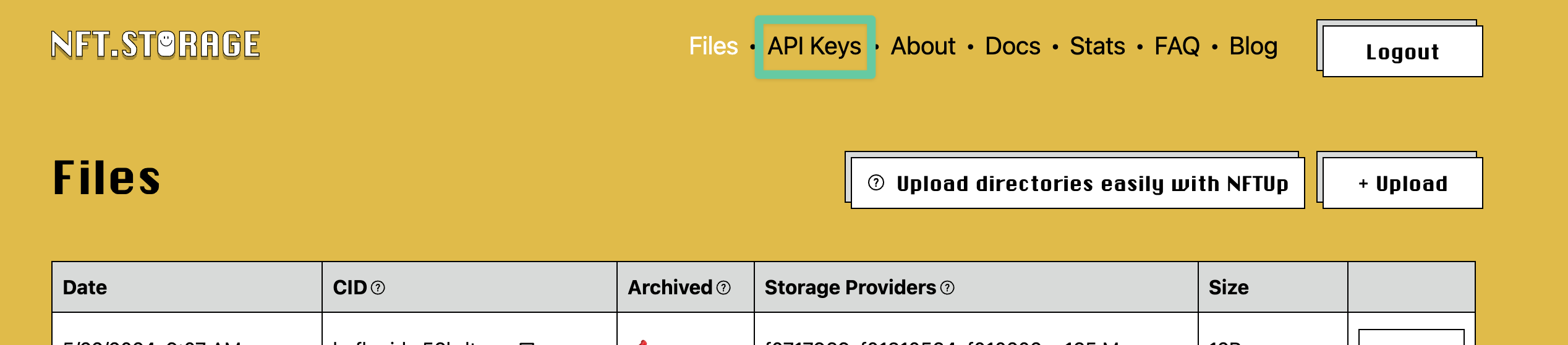 Once on the API keys page, either create a new key or copy an existing key. Once you have that key, head back over to Pinata. Click the avatar dropdown in the top-right, then choose the Integrations option.
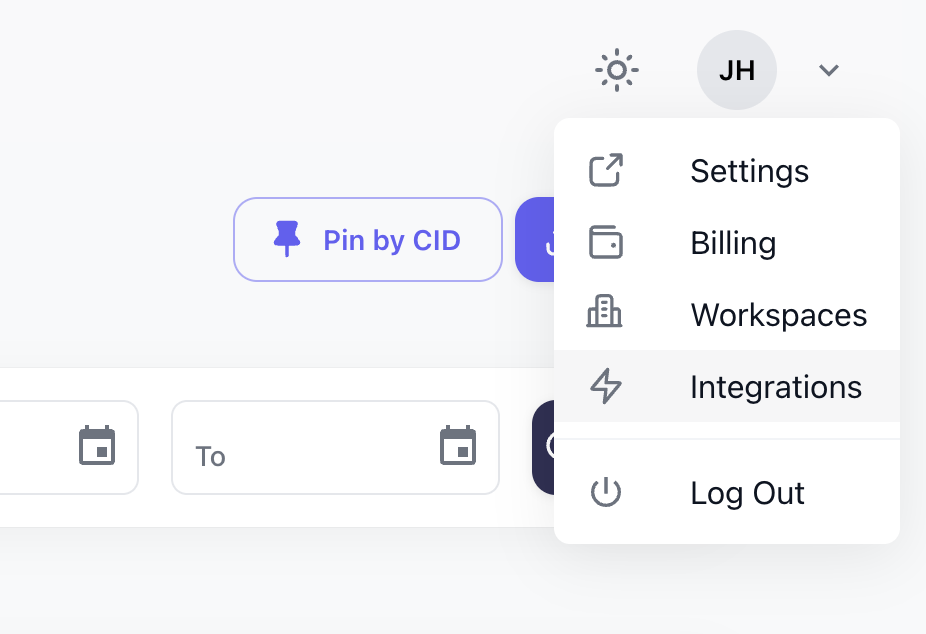 On the Integrations page, you’ll see a new integration for NFT.Storage. Click on that one and you’ll be prompted to enter your API key.
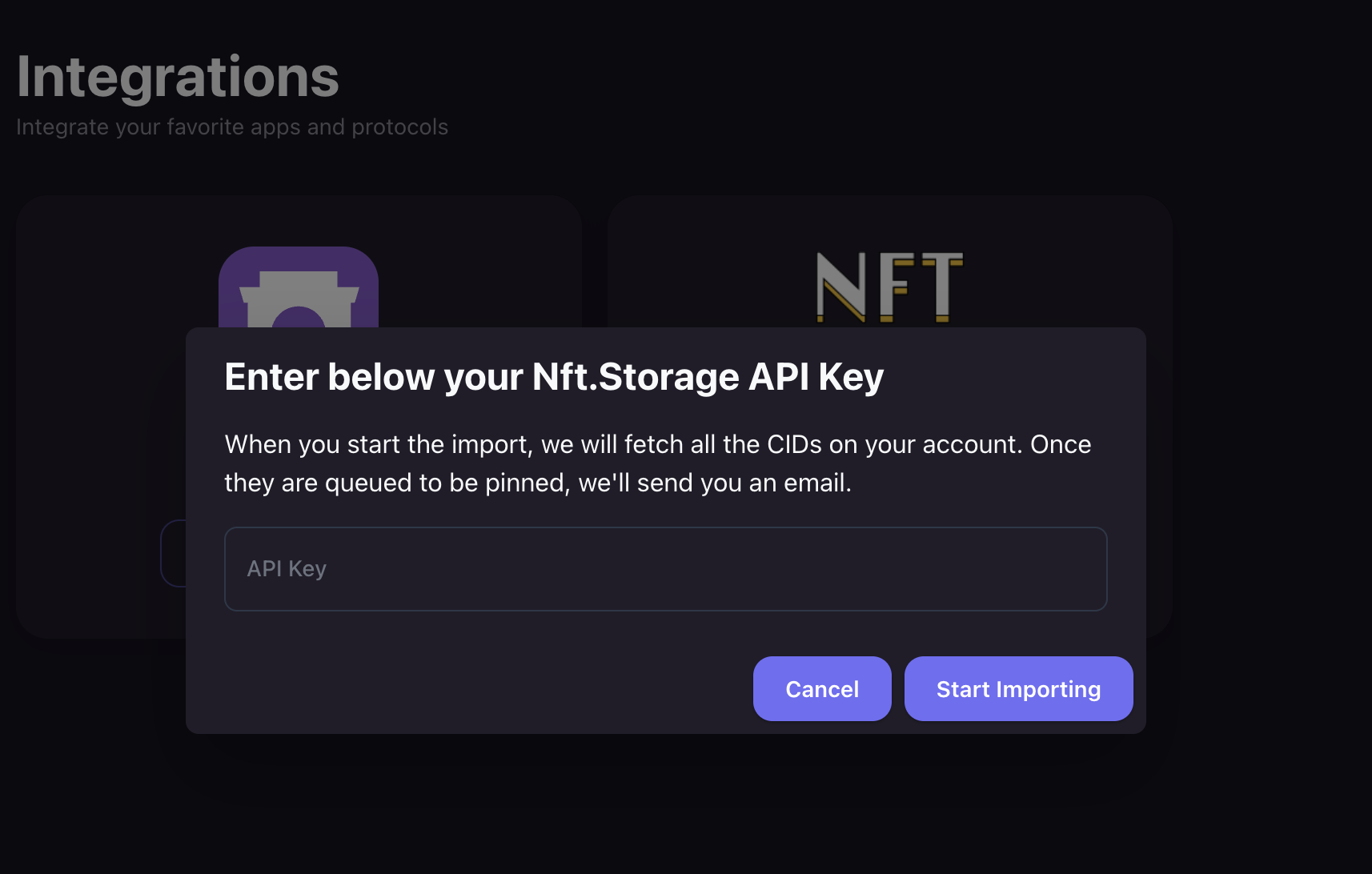 When you add your key and start the import, the process will work like this:
1. Pinata will make a `GET` request to find all the CIDs pinned to your [NFT.Storage](http://NFT.Storage) account
2. Pinata will then import all of those CIDs into a queue
3. Pinata will send you an email if we were able to add the CIDs to the queue or we’ll send you an error email if there was a problem
4. Pinata will begin the process of searching the IPFS network and pinning these files to your account
5. You can monitor the progress by going to the [Files Manager](https://app.pinata.cloud/pinmanager) and paying attention to the Pin By CID queue
When everything is complete, your Pin By CID queue will be empty and you’ll be fully migrated over.
This integration should make the process of migrating from [NFT.Storage](http://NFT.Storage) to Pinata as easy as possible. Once complete, you won’t have to worry about the future of your files as they will be safely pinned to IPFS using Pinata. They will also be accessible through your own [Dedicated IPFS Gateway](https://www.pinata.cloud/blog/what-is-a-dedicated-ipfs-gateway).
This documentation is built and hosted on [Mintlify](https://mintlify.com), a developer documentation platform.
When you add your key and start the import, the process will work like this:
1. Pinata will make a `GET` request to find all the CIDs pinned to your [NFT.Storage](http://NFT.Storage) account
2. Pinata will then import all of those CIDs into a queue
3. Pinata will send you an email if we were able to add the CIDs to the queue or we’ll send you an error email if there was a problem
4. Pinata will begin the process of searching the IPFS network and pinning these files to your account
5. You can monitor the progress by going to the [Files Manager](https://app.pinata.cloud/pinmanager) and paying attention to the Pin By CID queue
When everything is complete, your Pin By CID queue will be empty and you’ll be fully migrated over.
This integration should make the process of migrating from [NFT.Storage](http://NFT.Storage) to Pinata as easy as possible. Once complete, you won’t have to worry about the future of your files as they will be safely pinned to IPFS using Pinata. They will also be accessible through your own [Dedicated IPFS Gateway](https://www.pinata.cloud/blog/what-is-a-dedicated-ipfs-gateway).
This documentation is built and hosted on [Mintlify](https://mintlify.com), a developer documentation platform.