> ## Documentation Index
> Fetch the complete documentation index at: https://docs.pinata.cloud/llms.txt
> Use this file to discover all available pages before exploring further.
# Dedicated IPFS Gateways
Dedicated Gateways are the fastest way to fetch content from IPFS, and are the ideal tool when building decentralized applications. When you create a Pinata account, you'll automatically have a Dedicated Gateway created for you! To see it, simply visit the [Gateways Page](https://app.pinata.cloud/gateway).
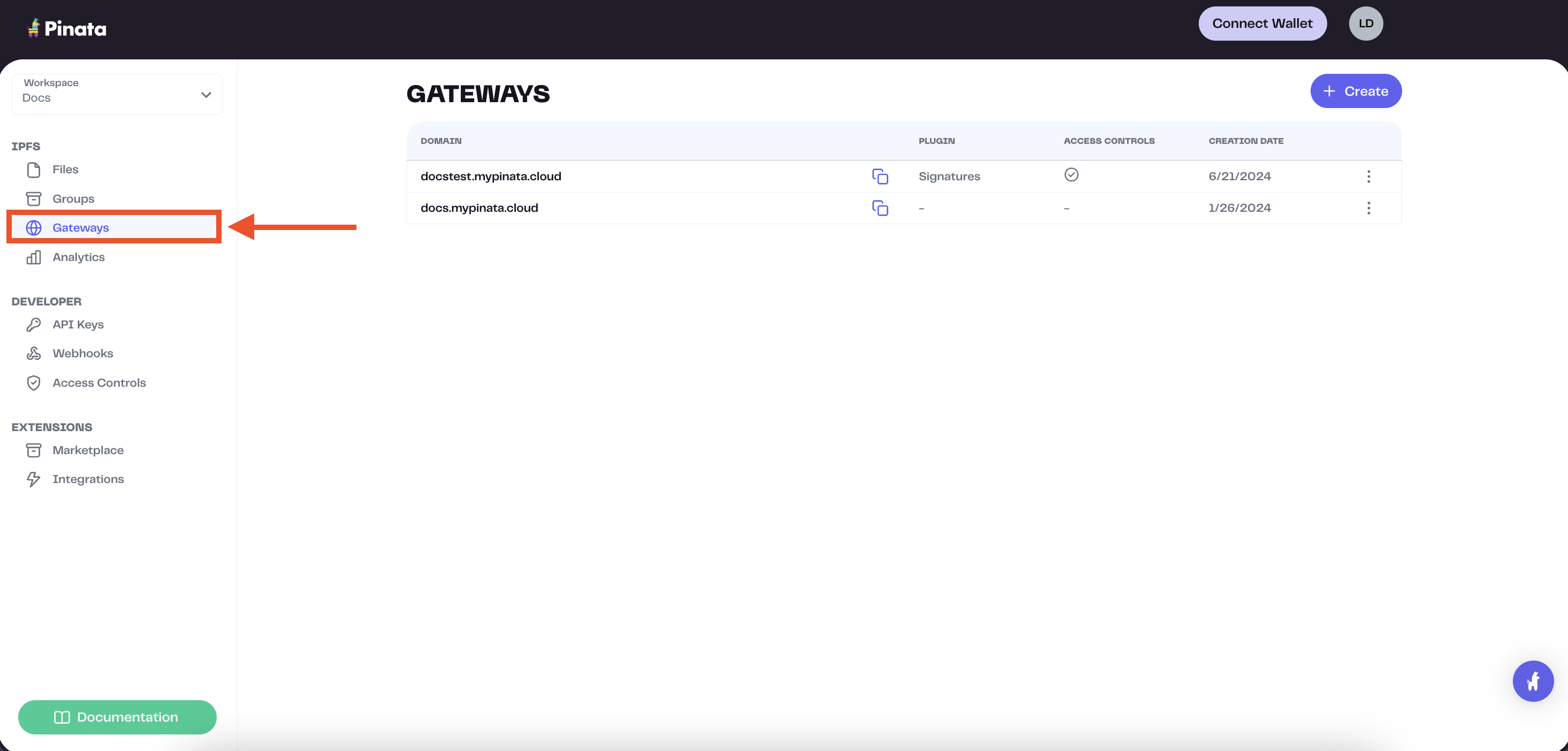 The gateway domains are randomly generated and might look something like this:
```
aquamarine-casual-tarantula-177.mypinata.cloud
```
## Viewing Content Through Your Gateway
To view content through your gateway, grab the CID of the file you'd like to view and add it to your gateway URL, like so:
The gateway domains are randomly generated and might look something like this:
```
aquamarine-casual-tarantula-177.mypinata.cloud
```
## Viewing Content Through Your Gateway
To view content through your gateway, grab the CID of the file you'd like to view and add it to your gateway URL, like so:
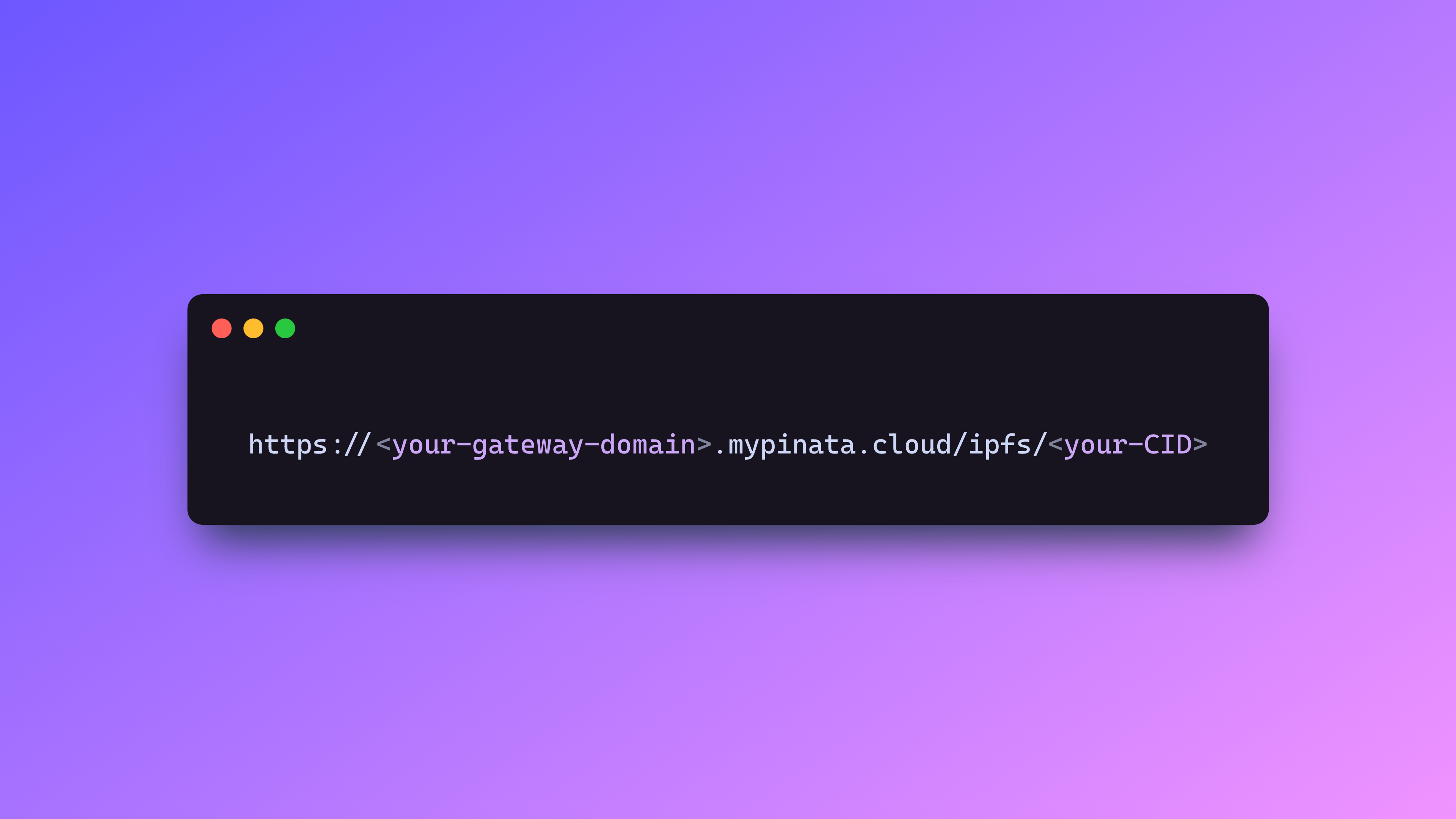 Simple as that!
You can also fetch the data programatically using the [get](/sdk/gateways/public/get) method in the [SDK](/sdk).
```typescript theme={null}
import { PinataSDK } from "pinata-web3";
const pinata = new PinataSDK({
pinataJwt: process.env.PINATA_JWT!,
pinataGateway: "example-gateway.mypinata.cloud",
});
const file = await pinata.gateways.public.get("QmVLwvmGehsrNEvhcCnnsw5RQNseohgEkFNN1848zNzdng")
```
## Restricted vs Open
All Pinata Dedicated Gateways are restricted by default. This mean they will only serve CIDs that are pinned to your account, which keeps your gateway safe from abuse by outside actors who may want to use it for themselves.
If you plan to upload content to your own account then use your gateway to fetch it, you shouldn't have to touch a thing and it will work as expected! However, lets say you're building a marketplace and you need to fetch content outside your account. In that case, you will want to use [Gateway Access Controls](/gateways/gateway-access-controls). Adding one of these will allow you to access CIDs from the public IPFS network, but it has to meet that access control condition, like a Gateway API Key or Host Origin requirement. Be sure to read our [docs on Gateway Access Controls](/gateways/gateway-access-controls) to learn more.
Simple as that!
You can also fetch the data programatically using the [get](/sdk/gateways/public/get) method in the [SDK](/sdk).
```typescript theme={null}
import { PinataSDK } from "pinata-web3";
const pinata = new PinataSDK({
pinataJwt: process.env.PINATA_JWT!,
pinataGateway: "example-gateway.mypinata.cloud",
});
const file = await pinata.gateways.public.get("QmVLwvmGehsrNEvhcCnnsw5RQNseohgEkFNN1848zNzdng")
```
## Restricted vs Open
All Pinata Dedicated Gateways are restricted by default. This mean they will only serve CIDs that are pinned to your account, which keeps your gateway safe from abuse by outside actors who may want to use it for themselves.
If you plan to upload content to your own account then use your gateway to fetch it, you shouldn't have to touch a thing and it will work as expected! However, lets say you're building a marketplace and you need to fetch content outside your account. In that case, you will want to use [Gateway Access Controls](/gateways/gateway-access-controls). Adding one of these will allow you to access CIDs from the public IPFS network, but it has to meet that access control condition, like a Gateway API Key or Host Origin requirement. Be sure to read our [docs on Gateway Access Controls](/gateways/gateway-access-controls) to learn more.
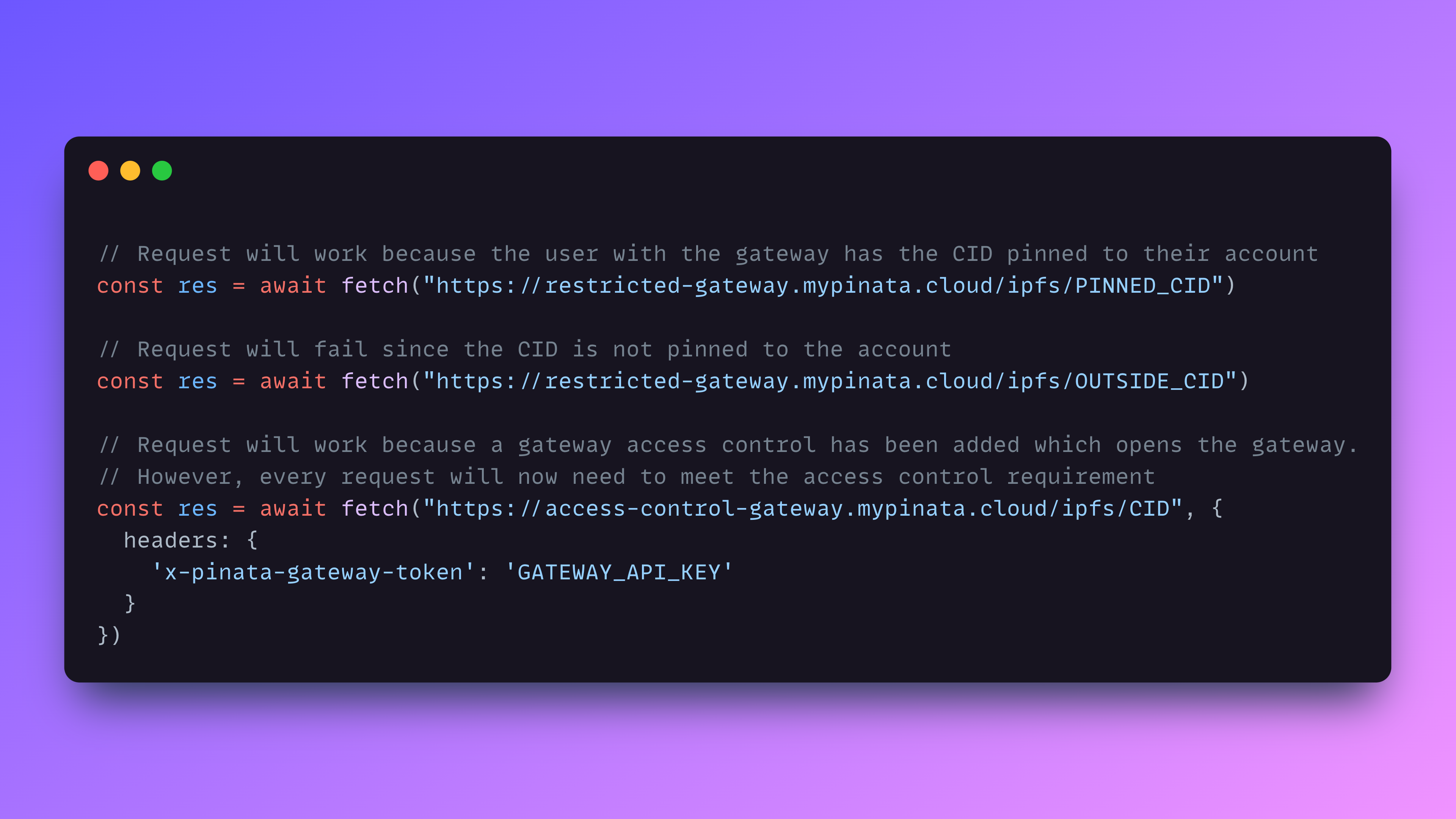 The only way to open a Dedicated Gateway and allow any CID to go through is to
add a Gateway Access Control
## Convert IPFS Links or Gateway URLs to use Your Dedicated Gateway
If you're a developer building an app to index the blockchain, it's likely you'll encounter several IPFS URL formats that might not be ideal to work with:
```
ipfs://QmVLwvmGehsrNEvhcCnnsw5RQNseohgEkFNN1848zNzdng
https://ipfs.io/ipfs/QmVLwvmGehsrNEvhcCnnsw5RQNseohgEkFNN1848zNzdng
```
The Pinata SDK is designed to assist you in scenarios like this. It can take IPFS urls, whether they are the protocol standard (`ipfs://`) or another gateway (`https://ipfs.io`), and turn them into your specified Dedicated Gateway.
```typescript theme={null}
import { PinataSDK } from "pinata-web3";
const pinata = new PinataSDK({
pinataJwt: process.env.PINATA_JWT!,
pinataGateway: "example-gateway.mypinata.cloud",
});
const url = await pinata.gateways.public
.convert("QmVLwvmGehsrNEvhcCnnsw5RQNseohgEkFNN1848zNzdng")
// Optionally add a different gateway prefix
// const url = await pinata.gateways.public
// .convert("QmVLwvmGehsrNEvhcCnnsw5RQNseohgEkFNN1848zNzdng", "https://ipfs.io")
```
## Adding a Custom Domain
Pinata also allows you to create a custom domain for your Dedicated Gateway. Simply visit the [Gateways Page](https://app.pinata.cloud/gateway), click the menu button on the right side of your gateway, then click Add Custom Domain. You'll need to own the domain you want to use. When you enter your domain, you will be prompted to enter DNS information through your registrar.
## Billing and Usage
When it comes to using a Dedicated Gateway, there are a few metrics Pinata uses for billing.
| Metric | Description |
| :-------- | :--------------------------------------------------------------------------------------------------------------------------------------------------------------------------------------------------------------------------------------------------------------------------------------------------------------------------------------------------------------------------------------- |
| Bandwidth | Bandwidth is the amount of data that is being going through your Gateway. For instance, if you have a 10MB file go through your gateway 100 times, that would be 1GB of bandwidth used for the month. |
| Requests | A request is anytime content is queried through the gateway, so if you run `wget https://mygateway.mypinata.cloud/ipfs/QmVLwvmGehsrNEvhcCnnsw5RQNseohgEkFNN1848zNzdng` in your terminal, that would be one request. Or if you had someone visit your app that uses the gateway on the client side, each time the website requests content from IPFS using the gateway, that's a request. |
Both of these metrics reset on a monthly basis based on your billing cycle.
If you're using a Dedicated Gateway for your NFT project, be sure to check out
[this
guide](https://knowledge.pinata.cloud/en/articles/6461213-token-uris-in-nft-projects)
on how you should do that.
If you have any questions in regards to billing, please don't hesitate to reach out via our chat in the bottom right of our app or [email us](mailto:team@pinata.cloud)!
The only way to open a Dedicated Gateway and allow any CID to go through is to
add a Gateway Access Control
## Convert IPFS Links or Gateway URLs to use Your Dedicated Gateway
If you're a developer building an app to index the blockchain, it's likely you'll encounter several IPFS URL formats that might not be ideal to work with:
```
ipfs://QmVLwvmGehsrNEvhcCnnsw5RQNseohgEkFNN1848zNzdng
https://ipfs.io/ipfs/QmVLwvmGehsrNEvhcCnnsw5RQNseohgEkFNN1848zNzdng
```
The Pinata SDK is designed to assist you in scenarios like this. It can take IPFS urls, whether they are the protocol standard (`ipfs://`) or another gateway (`https://ipfs.io`), and turn them into your specified Dedicated Gateway.
```typescript theme={null}
import { PinataSDK } from "pinata-web3";
const pinata = new PinataSDK({
pinataJwt: process.env.PINATA_JWT!,
pinataGateway: "example-gateway.mypinata.cloud",
});
const url = await pinata.gateways.public
.convert("QmVLwvmGehsrNEvhcCnnsw5RQNseohgEkFNN1848zNzdng")
// Optionally add a different gateway prefix
// const url = await pinata.gateways.public
// .convert("QmVLwvmGehsrNEvhcCnnsw5RQNseohgEkFNN1848zNzdng", "https://ipfs.io")
```
## Adding a Custom Domain
Pinata also allows you to create a custom domain for your Dedicated Gateway. Simply visit the [Gateways Page](https://app.pinata.cloud/gateway), click the menu button on the right side of your gateway, then click Add Custom Domain. You'll need to own the domain you want to use. When you enter your domain, you will be prompted to enter DNS information through your registrar.
## Billing and Usage
When it comes to using a Dedicated Gateway, there are a few metrics Pinata uses for billing.
| Metric | Description |
| :-------- | :--------------------------------------------------------------------------------------------------------------------------------------------------------------------------------------------------------------------------------------------------------------------------------------------------------------------------------------------------------------------------------------- |
| Bandwidth | Bandwidth is the amount of data that is being going through your Gateway. For instance, if you have a 10MB file go through your gateway 100 times, that would be 1GB of bandwidth used for the month. |
| Requests | A request is anytime content is queried through the gateway, so if you run `wget https://mygateway.mypinata.cloud/ipfs/QmVLwvmGehsrNEvhcCnnsw5RQNseohgEkFNN1848zNzdng` in your terminal, that would be one request. Or if you had someone visit your app that uses the gateway on the client side, each time the website requests content from IPFS using the gateway, that's a request. |
Both of these metrics reset on a monthly basis based on your billing cycle.
If you're using a Dedicated Gateway for your NFT project, be sure to check out
[this
guide](https://knowledge.pinata.cloud/en/articles/6461213-token-uris-in-nft-projects)
on how you should do that.
If you have any questions in regards to billing, please don't hesitate to reach out via our chat in the bottom right of our app or [email us](mailto:team@pinata.cloud)!