> ## Documentation Index
> Fetch the complete documentation index at: https://docs.pinata.cloud/llms.txt
> Use this file to discover all available pages before exploring further.
# Getting Started
> Learn how to use Dedicated Gateway plugins to supercharge your IPFS delivery system
Dedicated Gateways are crucial for retrieving and delivering content on IPFS, but there are times you may need additonal functionality. Gateway Plugins serve that purpose, anything from hot swapping CIDs to delivering signatures and more!
## Installing Plugins
You can install plugins either through the Pinata App or the Pinata API.
### Pinata App
To install a plugin navigate to the Plugins Marketplace tab on the right side.
 Once there you can find the plugin you want to install and click "Install." This will bring up a drop down of your Dedicated Gateways to choose which the plugin is installed to.
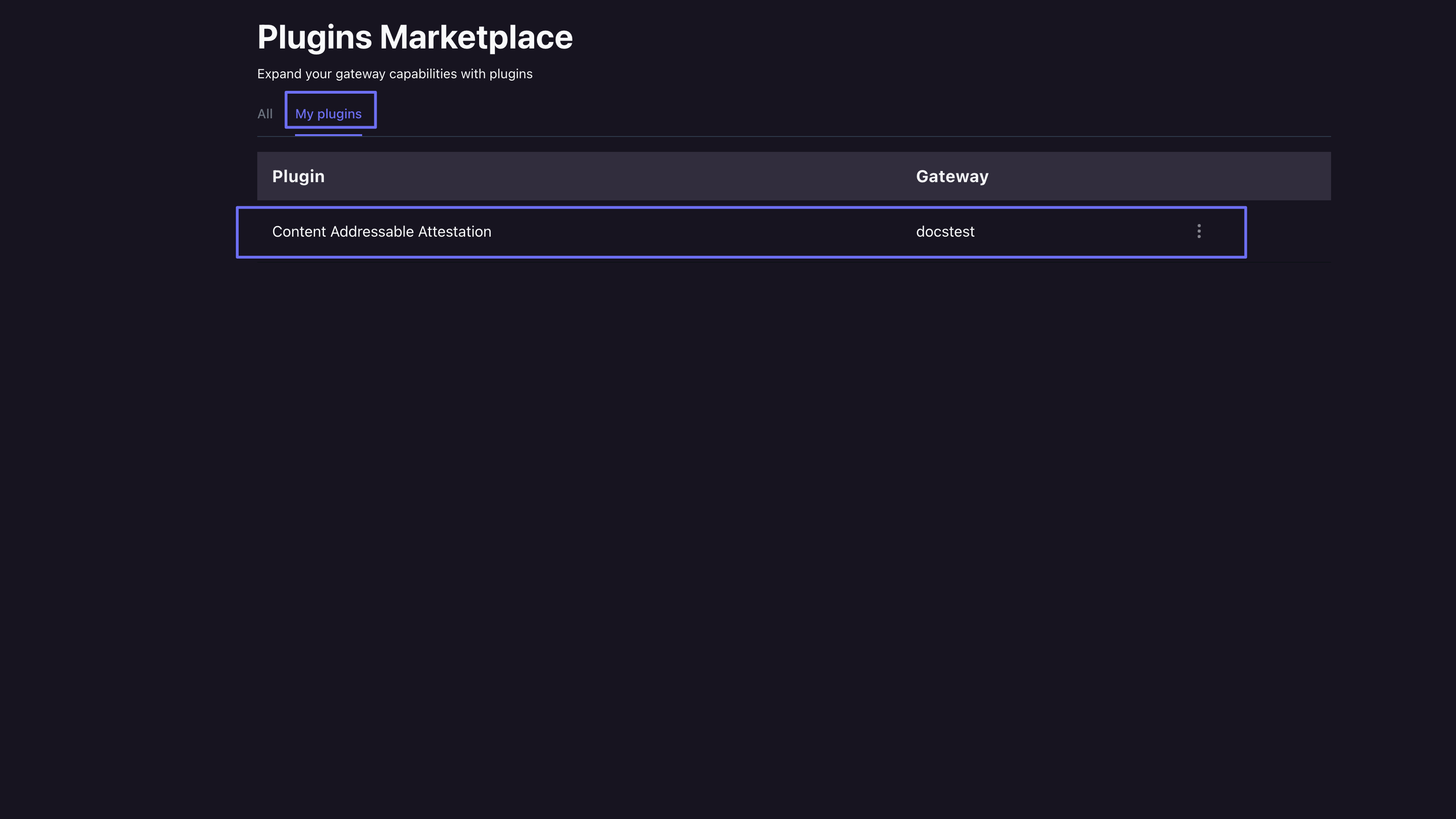
 Once installed you can confirm its there by going to the "My Plugins" tab.
 ### Pinata API
With the Pinata API you can list all available plugins using the [/ipfs/plugins\_marketplace](/api-reference/endpoint/ipfs/list-marketplace-plugins) endpoint.
```typescript Get Plugins theme={null}
const plugins = await fetch("https://api.pinata.cloud/v3/ipfs/plugins_marketplace", {
method: "GET",
headers: {
"Content-Type": "application/json",
Authorization: `Bearer ${PINATA_JWT}`
}
})
```
```json Response theme={null}
{
"data": [
{
"id": 1,
"name": "Content Addressable Attestation",
"description": "Verify the authenticity and ownership of files added to the IPFS network by signing them with your Ethereum wallet.",
"image": "https://mktg.mypinata.cloud/ipfs/QmVm3jRZ7S2KMmYEvkmkwncRCmBSUEuzNKfm2AgJkfBGKZ",
"tags": [
"verifiability",
"security"
]
},
{
"id": 2,
"name": "Hot Swaps",
"description": "Make IPFS mutable by pointing your original CID to a new file.",
"image": "https://mktg.mypinata.cloud/ipfs/QmVpy6v7YASWUQjmqgUxKwbn6zgzuVSRudzdZMynpBjSJo",
"tags": [
"files"
]
}
]
}
```
To install one you can make a request to [/ipfs/gateway\_plugins/:gateway\_id](/api-reference/endpoint/ipfs/install-gateway-plugin) by using the [gateway\_id](/api-reference/endpoint/ipfs/list-gateways) as a path parameter and the `plugin_id` as body of the request.
```typescript Install Plugin theme={null}
const data = JSON.stringify({
plugin_id: 1
})
const gatewayId = "8673cd80-bf53-4bca-b684-bec1d6bdf004"
const installPlugin = await fetch(`https://api.pinata.cloud/v3/ipfs/gateway_plugins/${gatewayId}`, {
method: "POST",
headers: {
"Content-Type": "application/json",
Authorization: `Bearer ${PINATA_JWT}`
},
body: data
})
```
```json Response theme={null}
{
"data": {
"gateway_id": "8673cd80-bf53-4bca-b684-bec1d6bdf004",
"plugin_id": 1
}
}
```
You can confirm the plugin is installed by using [/ipfs/gateway\_plugins/:gateway\_id](/api-reference/endpoint/ipfs/list-installed-plugins-for-gateway)
```typescript Get Plugins for Gateway theme={null}
const gatewayId = "8673cd80-bf53-4bca-b684-bec1d6bdf004"
const installPlugin = await fetch(`https://api.pinata.cloud/v3/ipfs/gateway_plugins/${gatewayId}`, {
method: "GET",
headers: {
"Content-Type": "application/json",
Authorization: `Bearer ${PINATA_JWT}`
}
})
```
```json Response theme={null}
{
"data": {
"gateway_id": "8673cd80-bf53-4bca-b684-bec1d6bdf004",
"plugin_id": 1
}
}
```
## Using Plugins
Each plugin has its own unique use case and usage, please see the appropriate links for each one to see how they are used.
[Content Addressable Plugin](/gateways/plugins/content-addressable)
## Uninstalling Plugins
Just like installing, removing a plugin can be done through the Pinata App or the Pinata API.
### Pinata App
To unintall a plugin first navigate to the Plugin Marketplace tab and then select the "My Plugins" tab.
### Pinata API
With the Pinata API you can list all available plugins using the [/ipfs/plugins\_marketplace](/api-reference/endpoint/ipfs/list-marketplace-plugins) endpoint.
```typescript Get Plugins theme={null}
const plugins = await fetch("https://api.pinata.cloud/v3/ipfs/plugins_marketplace", {
method: "GET",
headers: {
"Content-Type": "application/json",
Authorization: `Bearer ${PINATA_JWT}`
}
})
```
```json Response theme={null}
{
"data": [
{
"id": 1,
"name": "Content Addressable Attestation",
"description": "Verify the authenticity and ownership of files added to the IPFS network by signing them with your Ethereum wallet.",
"image": "https://mktg.mypinata.cloud/ipfs/QmVm3jRZ7S2KMmYEvkmkwncRCmBSUEuzNKfm2AgJkfBGKZ",
"tags": [
"verifiability",
"security"
]
},
{
"id": 2,
"name": "Hot Swaps",
"description": "Make IPFS mutable by pointing your original CID to a new file.",
"image": "https://mktg.mypinata.cloud/ipfs/QmVpy6v7YASWUQjmqgUxKwbn6zgzuVSRudzdZMynpBjSJo",
"tags": [
"files"
]
}
]
}
```
To install one you can make a request to [/ipfs/gateway\_plugins/:gateway\_id](/api-reference/endpoint/ipfs/install-gateway-plugin) by using the [gateway\_id](/api-reference/endpoint/ipfs/list-gateways) as a path parameter and the `plugin_id` as body of the request.
```typescript Install Plugin theme={null}
const data = JSON.stringify({
plugin_id: 1
})
const gatewayId = "8673cd80-bf53-4bca-b684-bec1d6bdf004"
const installPlugin = await fetch(`https://api.pinata.cloud/v3/ipfs/gateway_plugins/${gatewayId}`, {
method: "POST",
headers: {
"Content-Type": "application/json",
Authorization: `Bearer ${PINATA_JWT}`
},
body: data
})
```
```json Response theme={null}
{
"data": {
"gateway_id": "8673cd80-bf53-4bca-b684-bec1d6bdf004",
"plugin_id": 1
}
}
```
You can confirm the plugin is installed by using [/ipfs/gateway\_plugins/:gateway\_id](/api-reference/endpoint/ipfs/list-installed-plugins-for-gateway)
```typescript Get Plugins for Gateway theme={null}
const gatewayId = "8673cd80-bf53-4bca-b684-bec1d6bdf004"
const installPlugin = await fetch(`https://api.pinata.cloud/v3/ipfs/gateway_plugins/${gatewayId}`, {
method: "GET",
headers: {
"Content-Type": "application/json",
Authorization: `Bearer ${PINATA_JWT}`
}
})
```
```json Response theme={null}
{
"data": {
"gateway_id": "8673cd80-bf53-4bca-b684-bec1d6bdf004",
"plugin_id": 1
}
}
```
## Using Plugins
Each plugin has its own unique use case and usage, please see the appropriate links for each one to see how they are used.
[Content Addressable Plugin](/gateways/plugins/content-addressable)
## Uninstalling Plugins
Just like installing, removing a plugin can be done through the Pinata App or the Pinata API.
### Pinata App
To unintall a plugin first navigate to the Plugin Marketplace tab and then select the "My Plugins" tab.
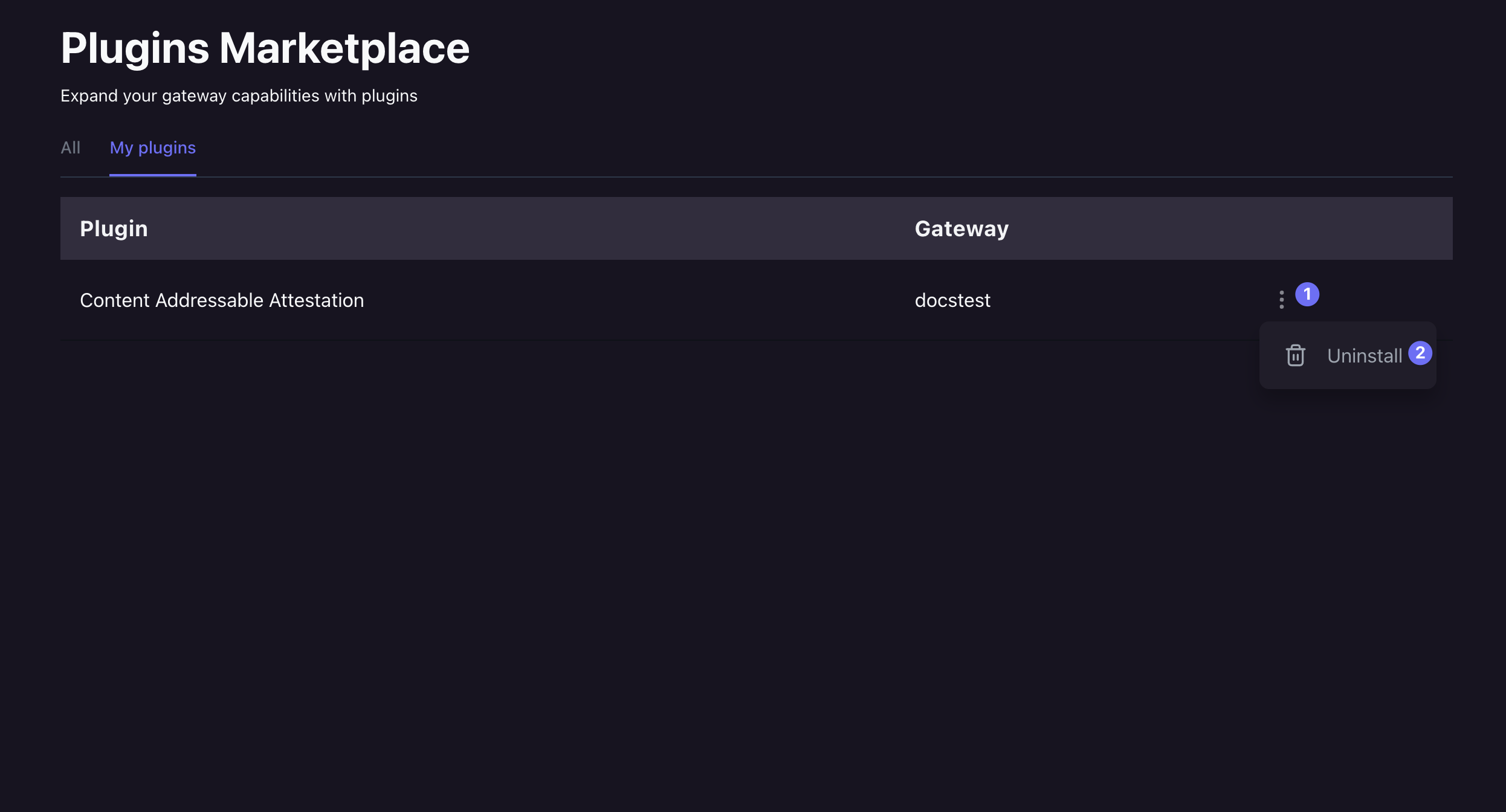
 Then locate the target gateway and plugin, then click the action item on the right hand side and select "Uninstall" from the dropdown menu.
 ### Pinata API
To uninstall a plug from the API you can use the [/ipfs/gateway\_plugins/:gateway\_id/plugin/:plugin\_id](/api-reference/endpoint/ipfs/uninstall-gateway-plugin) endpoint, where the `gateway_id` is the target gateway and the `plugin_id` is the target plugin to uninstall.
```typescript Install Plugin theme={null}
const gatewayId = "8673cd80-bf53-4bca-b684-bec1d6bdf004"
const pluginId = 1
const uninstallPlugin = await fetch(`https://api.pinata.cloud/v3/ipfs/gateway_plugins/${gatewayId}/plugin/${pluginId}`, {
method: "DELETE",
headers: {
"Content-Type": "application/json",
Authorization: `Bearer ${PINATA_JWT}`
}
})
```
### Pinata API
To uninstall a plug from the API you can use the [/ipfs/gateway\_plugins/:gateway\_id/plugin/:plugin\_id](/api-reference/endpoint/ipfs/uninstall-gateway-plugin) endpoint, where the `gateway_id` is the target gateway and the `plugin_id` is the target plugin to uninstall.
```typescript Install Plugin theme={null}
const gatewayId = "8673cd80-bf53-4bca-b684-bec1d6bdf004"
const pluginId = 1
const uninstallPlugin = await fetch(`https://api.pinata.cloud/v3/ipfs/gateway_plugins/${gatewayId}/plugin/${pluginId}`, {
method: "DELETE",
headers: {
"Content-Type": "application/json",
Authorization: `Bearer ${PINATA_JWT}`
}
})
```