> ## Documentation Index
> Fetch the complete documentation index at: https://docs.pinata.cloud/llms.txt
> Use this file to discover all available pages before exploring further.
# Credits
> Fund Pinata-hosted model usage and configure auto top-up
Credits are a prepaid balance that funds usage of Pinata-hosted models — both inside an [agent](/agents/models) (the `Pinata` provider) and through the [Inference](/inference/overview) endpoint directly. Token usage draws the balance down; when it runs out, those requests fail until you add more.
Credits only apply to **Pinata-hosted** models. Agents that use your own provider keys (OpenAI, Anthropic, OpenRouter, etc. — see [Secrets](/agents/secrets)) bill through that provider, not credits. The [free tier](/agents/models#free-tier-agents) doesn't use credits either.
## How credits are consumed
* Usage is metered per token across prompt and completion, at each model's published rates — see [Models](/inference/models) for current pricing.
* When you run out of credits, Pinata-hosted requests return `402` until you top up. Requests against your own provider keys are unaffected.
All credit routes authenticate with your standard Pinata JWT.
### Check your balance
```bash theme={null}
curl https://agents.pinata.cloud/v0/credits/balance \
-H "Authorization: Bearer $PINATA_JWT"
```
```json Response theme={null}
{ "total": 100.0, "loaned": 0.5, "available": 99.5 }
```
`available` is what you can spend right now — `total` minus `loaned` (credits held against in-flight requests). Values are in credits.
## Top up
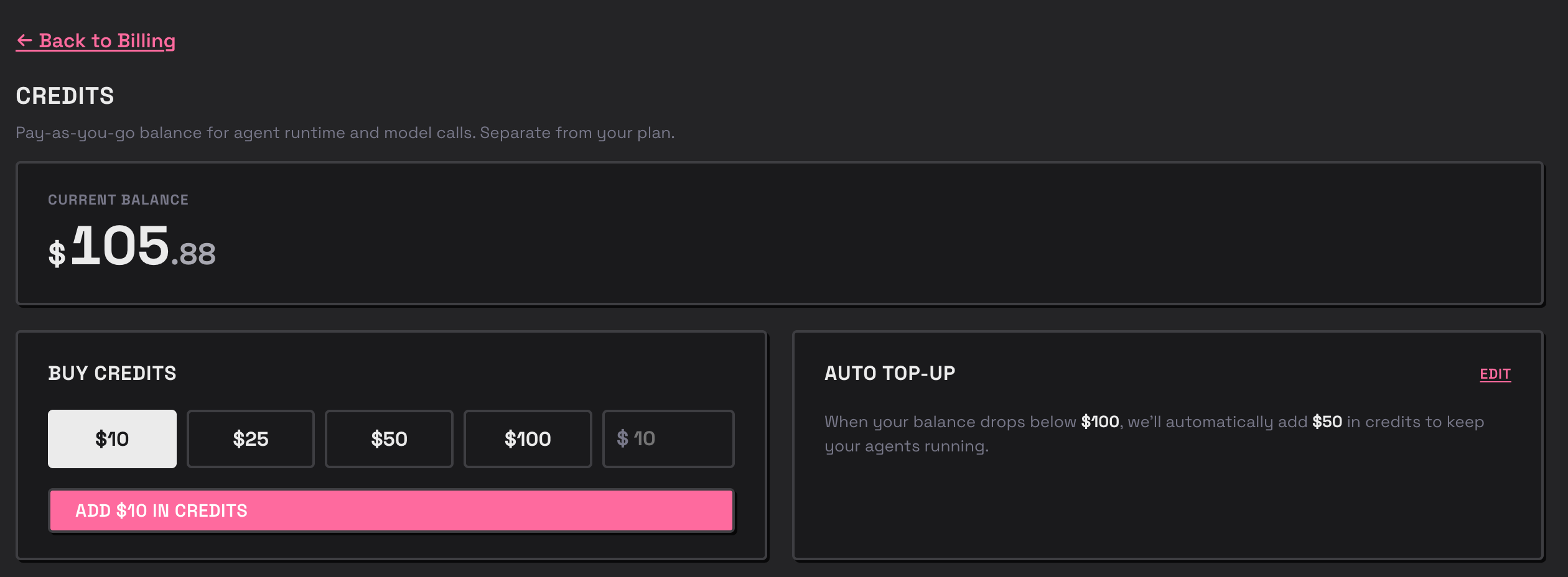
Buy credits from the **Billing** dashboard in the [Agents app](https://agents.pinata.cloud). Purchases are charged through Stripe against the payment method on file, and your balance updates as soon as the payment clears.
 ## Auto top-up
Auto top-up keeps the balance from running dry by automatically purchasing more credits when it drops below a threshold — useful for production agents and Inference traffic you don't want interrupted. You can set it up in the **Billing** dashboard of the [Agents app](https://agents.pinata.cloud), or via the API below.
| Setting | Rules |
| ------------- | ------------------------------------------------------------------------------------- |
| **Threshold** | When `available` drops below this, a top-up triggers. Must be at least `5`, or `null` |
| **Amount** | How many credits to buy each time it triggers. Positive integer, or `null` |
Set both to `null` to disable auto top-up.
### Configure auto top-up
```bash theme={null}
curl -X PUT https://agents.pinata.cloud/v0/credits/topup/config \
-H "Authorization: Bearer $PINATA_JWT" \
-H "Content-Type: application/json" \
-d '{ "threshold": 10, "amount": 50 }'
```
```json Response theme={null}
{ "ok": true }
```
Read the current config with `GET /v0/credits/topup/config`:
```json Response theme={null}
{ "threshold": 10, "amount": 50 }
```
Auto top-up charges the payment method on file whenever the threshold is crossed. Set the threshold and amount deliberately so a runaway agent can't trigger repeated charges.
## Related
The Pinata LLM endpoint credits pay for
Pinata-hosted vs. bring-your-own-key
## Auto top-up
Auto top-up keeps the balance from running dry by automatically purchasing more credits when it drops below a threshold — useful for production agents and Inference traffic you don't want interrupted. You can set it up in the **Billing** dashboard of the [Agents app](https://agents.pinata.cloud), or via the API below.
| Setting | Rules |
| ------------- | ------------------------------------------------------------------------------------- |
| **Threshold** | When `available` drops below this, a top-up triggers. Must be at least `5`, or `null` |
| **Amount** | How many credits to buy each time it triggers. Positive integer, or `null` |
Set both to `null` to disable auto top-up.
### Configure auto top-up
```bash theme={null}
curl -X PUT https://agents.pinata.cloud/v0/credits/topup/config \
-H "Authorization: Bearer $PINATA_JWT" \
-H "Content-Type: application/json" \
-d '{ "threshold": 10, "amount": 50 }'
```
```json Response theme={null}
{ "ok": true }
```
Read the current config with `GET /v0/credits/topup/config`:
```json Response theme={null}
{ "threshold": 10, "amount": 50 }
```
Auto top-up charges the payment method on file whenever the threshold is crossed. Set the threshold and amount deliberately so a runaway agent can't trigger repeated charges.
## Related
The Pinata LLM endpoint credits pay for
Pinata-hosted vs. bring-your-own-key